The New Copilot Studio: The Building Blocks, the Cost, and What Changed
Published August 19, 2026 by Joel Thyberg
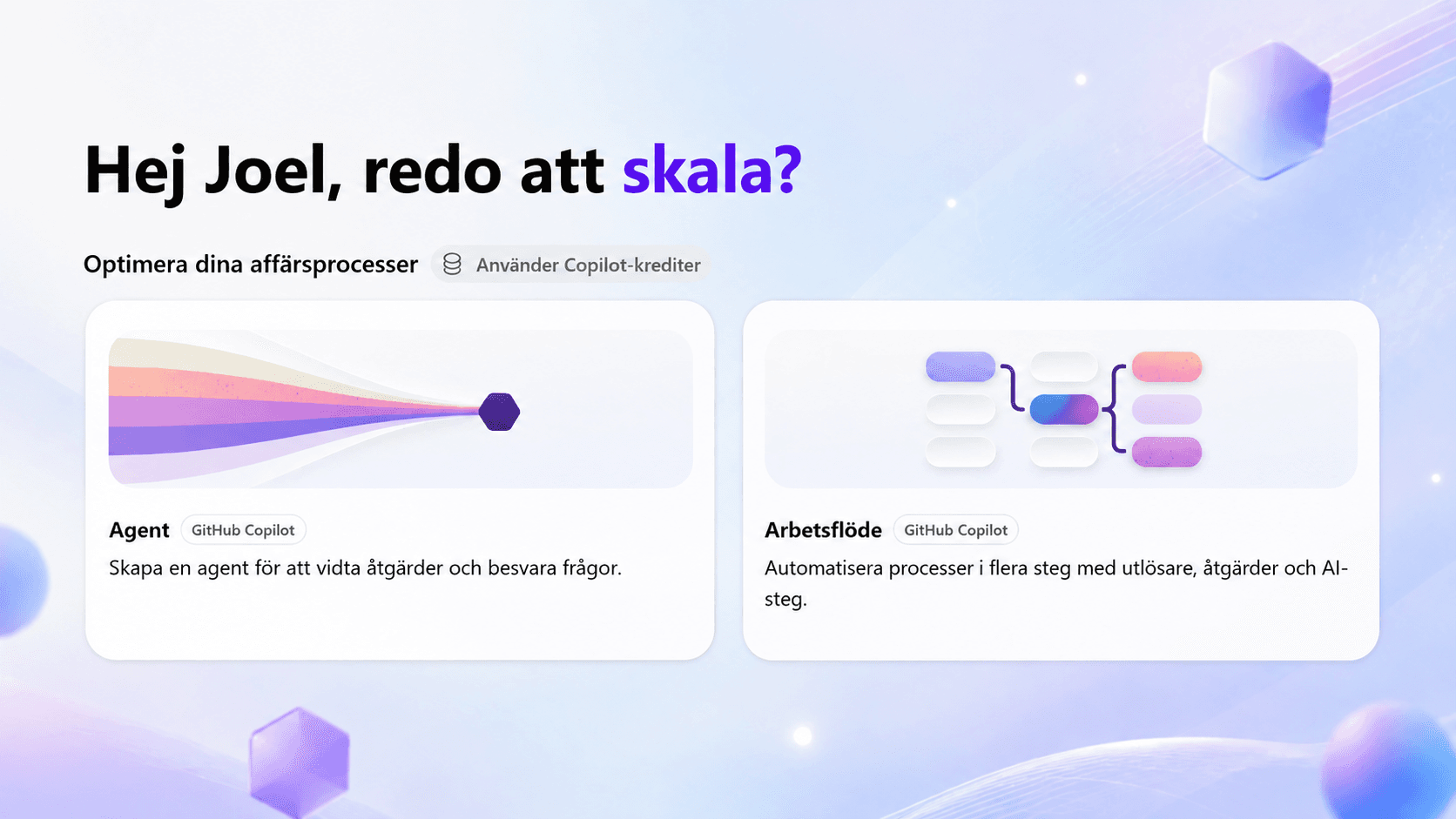
Microsoft has shipped a major upgrade to Copilot Studio, its low-code tool for building AI agents. What has mainly been replaced is the engine underneath the agent, meaning the part that drives how it actually works. The new engine is called the GitHub Copilot harness.
Microsoft describes it as its most capable option:
“The most capable option, built for reasoning-heavy agents and workflows that need to complete complex business processes.”
Source: Choose a harness
The biggest shift shows up in how the agent works. You used to draw up topics, flows, and branching logic that the agent followed. Now it does not need to be steered as tightly. You build the conditions, meaning what the agent knows, what it is allowed to do, and how it should behave, and then it takes a goal, picks its own route, and adjusts when something does not work.
That it can work this way comes down to how it is built underneath, meaning the new harness. We covered that in detail in inside the GitHub Copilot harness.
The purpose of this article is the whole picture: what you assemble an agent from, what it costs, and what actually differs from the old engine. We start with the engine, because everything else builds on it.
What Is a Harness?
An agent can be described simply as model plus harness. The model provides the intelligence and the reasoning. The harness is all the software around the model that decides what it gets to know, what it can do, how actions are actually carried out, and how the agent's working loop is steered. Instructions, skills, tools, orchestration, guardrails, monitoring, and the execution environment are therefore parts of the harness, not separate systems standing next to it.
Swapping the engine is bigger than it sounds, then. The harness decides how independently the agent gets to work, which capabilities are there out of the box, and how usage is billed.
Three Harnesses, and a Choice That Deserves Thought
The upgrade brings three harnesses to choose between, and you make the choice when the agent is created. In practice the choice is between two of them. The third, the Copilot chat harness, is there for something else: giving Microsoft 365 Copilot Chat access to your company's own knowledge.
GitHub Copilot harness
For reasoning-heavy multi-step tasks. Takes a goal, breaks it into steps, and adjusts when something fails.
Standard harness
For rule-driven agents and predictable flows. You define topics, prompts, and paths, and the agent follows them.
Copilot chat harness
For extending Microsoft 365 Copilot Chat with company knowledge. Published to internal teams.
The decisive part is in Microsoft's own documentation:
“Agents created with the GitHub Copilot harness can't be transferred to the standard harness, and vice versa.”
Source: Agents overview
So there is no standardized way to move an agent from one harness to the other. That makes the first choice important, and further down the article there is a short comparison to work from.
There is an unofficial route for migrating agents, though. Microsoft has published microsoft/copilot-studio-plugin, a plugin for AI coding agents that works against the underlying YAML of the agents and has a /migrate command. It does an AI-assisted rebuild based on capabilities rather than a component transfer. The caveat is stated plainly: it is an experimental research project and not an officially supported Microsoft product, so generated YAML needs review before it is pushed to an environment.
There is neither a requirement nor a rush to move over. The older way lives on beside the new one, because they serve different purposes, and Microsoft writes explicitly that agents on the standard harness continue to be fully supported.
The Building Blocks
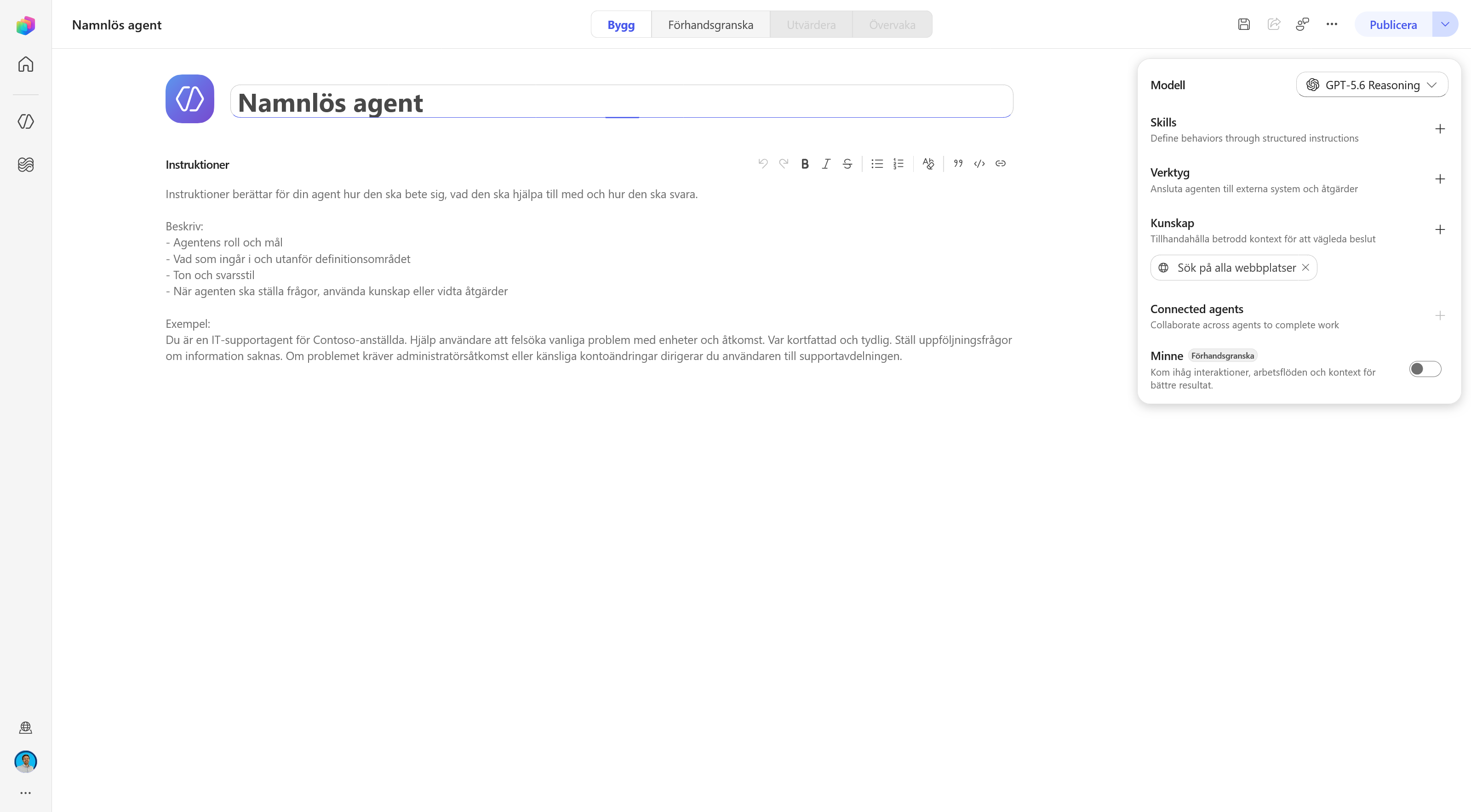
The agent is assembled from seven parts, configured from the Build tab. Each one has its own surface in the components panel and its own rules.
Instructions
Identity, tone, scope, and behavior.
Knowledge
Data sources that give context to the answers.
Skills
Reusable, task-specific ways of working.
Tools
Actions through connectors, MCP, and workflows.
Model
Which AI model powers the reasoning.
Memory
A kind of long-term memory between interactions.
Connected agents
Delegation to another agent.
Around them sit four tabs: Build for configuring the agent, Preview for testing it interactively, Evaluate for test sets that measure agent quality, and Monitor for following tasks, activity, and which files the agent has accessed.
There is a single selection rule to learn: the orchestrator chooses based on name and description. It is worth taking seriously precisely because Microsoft writes it down in three separate places, one for each component type.
“The tool's name and description are critical. Well-described tools are invoked more accurately.” · Tools
“Well-written skill descriptions help the orchestrator invoke the right skill at the right time.” · Skills
“The routing decision is based on: The connected agent's name and description…” · Connected agents
If you want something used more often, you write a broader description. If you want it used less often, you write a narrower one.
Instructions
Instructions are now the primary mechanism for controlling behavior, unlike the standard harness where topic flows and triggers do much of that job.
Microsoft lists five things to consider including:
- the agent's primary role and purpose
- the tone and style the agent should use, for example formal, friendly, or concise
- topics or tasks the agent should decline or redirect
- how the agent should handle unclear or ambiguous user input
- any escalation or handoff triggers
The editor supports rich text, meaning bold, italics, lists, block quotes, inline code, and links. The instructions do not have to be a flat wall of text. No character or token limit is stated in the documentation.
One pitfall is worth knowing about, because it looks harmless while you are writing. Microsoft warns explicitly against interfering with how citations are generated:
"Don't modify, override, or interfere with the system-defined citation format or behavior."
Source: Write agent instructions
If you tell the agent to leave out sources, or to answer in a fixed format, the citations can disappear. The system may then treat the answer as the model's general knowledge and discard it, even though it was correct. Microsoft's own advice is otherwise simple: start with a short description of the purpose, test in Preview, and build out from there. Changes apply from the next answer.
Knowledge
Knowledge sources are what the agent grounds its answers in. Under the hood sits a RAG pipeline built on Azure AI services, with query optimization, search providers such as Bing, SharePoint, Graph, Dataverse, and Azure AI Search, a summarization engine that produces cited answers, and a moderation layer.
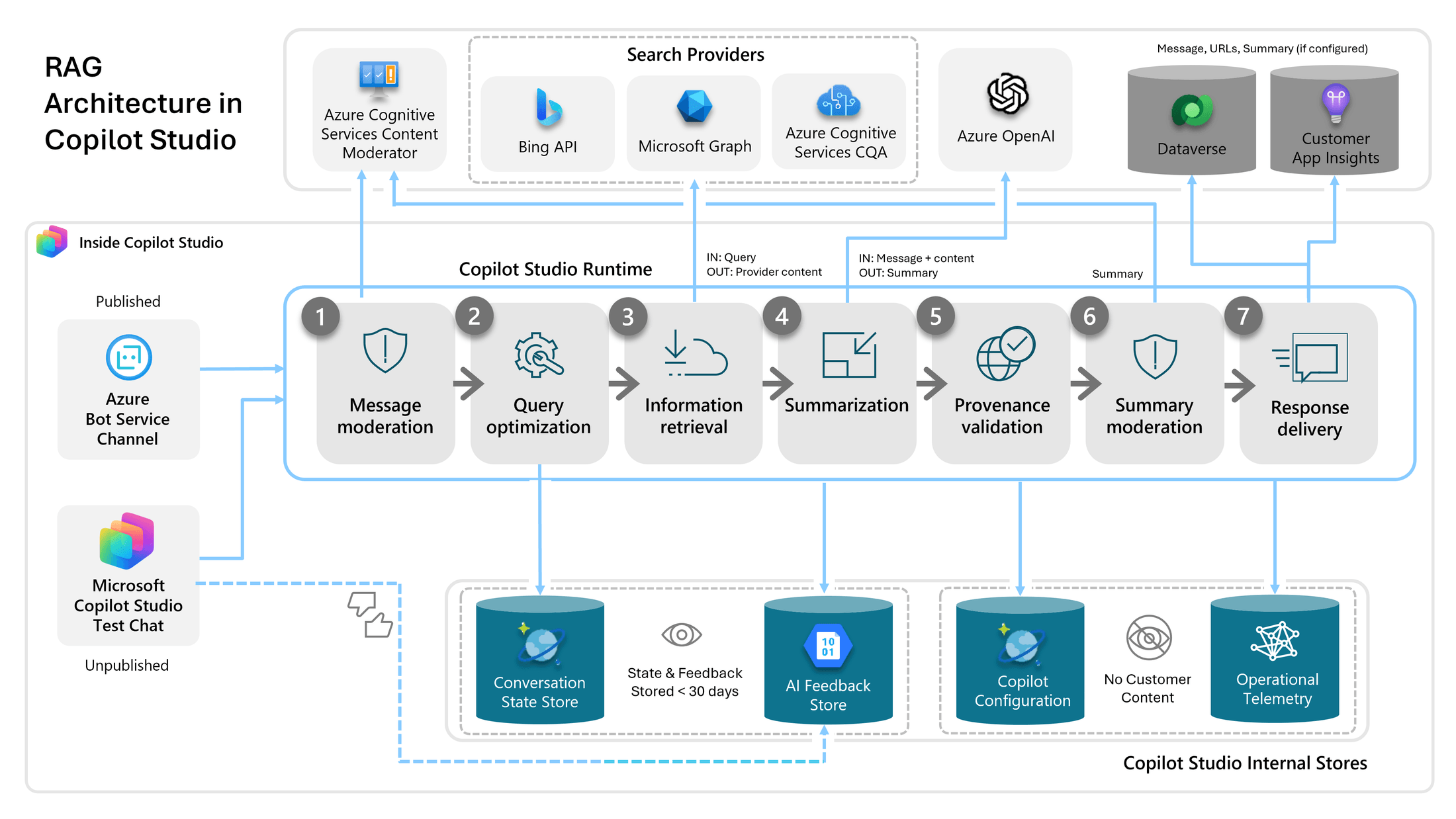
That the knowledge path is shared is actually the point. Microsoft says so directly:
“Agents powered by the GitHub Copilot harness support the same categories of knowledge sources as the standard harness, including websites, SharePoint, and uploaded files.”
The caveat they make themselves is that the interface and the defaults can differ between the experiences, and that you compare by testing in Preview. Knowledge is therefore the building block that has changed the least.
It Is Not One Single Semantic Search
There is a misconception worth clearing up here, because it shapes what people think they can ask. RAG in Copilot Studio is a pipeline, but the retrieval itself is not one and the same vector search across everything you have connected. Each source type has its own search path, and Microsoft describes them differently:
Public websites
The query runs against Bing, but only hits from the websites you listed are returned.
SharePoint
Connects to a SharePoint URL and uses GraphSearch. Only content the user is allowed to read is returned.
Uploaded files
Stored in Dataverse and indexed in Dataverse search, with image and table recognition in PDFs.
Dataverse tables
Natural language questions are turned into analytical queries over structured data.
Connectors
Company data already indexed by Microsoft Search, or live calls to systems such as Salesforce, ServiceNow, and Azure SQL.
Azure AI Search
The only source Microsoft describes as vector-based semantic search. The connection is not delegated, so no permission trimming happens.
Semantic search exists, then, but as one mechanism among several and partly as an add-on. There is a setting called tenant graph grounding with semantic search. Turn it on and the agent gets to search the same semantic index Microsoft 365 Copilot uses, which gives better hits above all in SharePoint. It requires that someone in the organization holds a Microsoft 365 Copilot license, and it costs extra credits.
Two numbers are worth knowing. Before the search, the question is rewritten using the last ten turns of the conversation. Then the top three hits from each source are retrieved. What the agent gets to see is short excerpts, not whole documents.
More important, though, is what RAG is for, because expectations often land in the wrong place.
A good fit for
Answering questions from knowledge bases. Summarizing policies, FAQs, and procedures. Retrieving specific facts from files or internal systems.
Not intended for
Complete document comparison. Complex reasoning across several documents. Calculations within one and the same document.
And this is where the new harness differs most in practice. In the old Copilot Studio, knowledge retrieval was essentially the only route to the company data, so questions that did not fit that shape could not be asked. The new agent can instead go to the files, open a whole document when the excerpt is not enough, open several documents when the question spans them, and run code when something has to be counted. Microsoft's own comparison table spells out the difference in the row about files:
“Creates, edits, and reasons over Word, Excel, PowerPoint, and PDF files.”
Source: Choose a harness
The same row for the standard harness reads “Not a focus”.
That makes it considerably better at working with company data.
An Example: The Question RAG Cannot Answer on Its Own
We uploaded a product catalog as a knowledge source, a 36-page PDF of HAY's lighting range, and asked a question that requires going through the whole thing: which is the most expensive lamp designed by Naoto Fukasawa, and what does it cost?
That is exactly the kind of question three excerpts cannot answer. Getting it right means finding every Fukasawa lamp in the catalog and comparing the prices. The activity trace shows how the agent solved it, in four steps.
The agent did not start by searching. It started by loading a skill. search-before-answer is one of the harness's built-in skills, and its description opens with REQUIRED FIRST: it is to run before the agent answers anything that could be found in a connected source.
Then the knowledge source was searched, and the search tool flags its own limits. Its description states that hits from documents are partial excerpts, and that the agent should fetch the whole document when the answer requires complete data, for example for calculations, totals, full listings, or analysis across several documents.
Then comes the part that is the whole point. The search result contains a single hit, and attached to it is the line “File downloaded to sandbox: HAY-Lighting.pdf” with an instruction to open the file using the most appropriate skill or tool. The catalog now sits on the agent's workspace, not as an excerpt but as a file.
Finally a second built-in skill is loaded, analyzing-pdf, which preprocesses the document into searchable artifacts and works through the product pages before the agent answers.
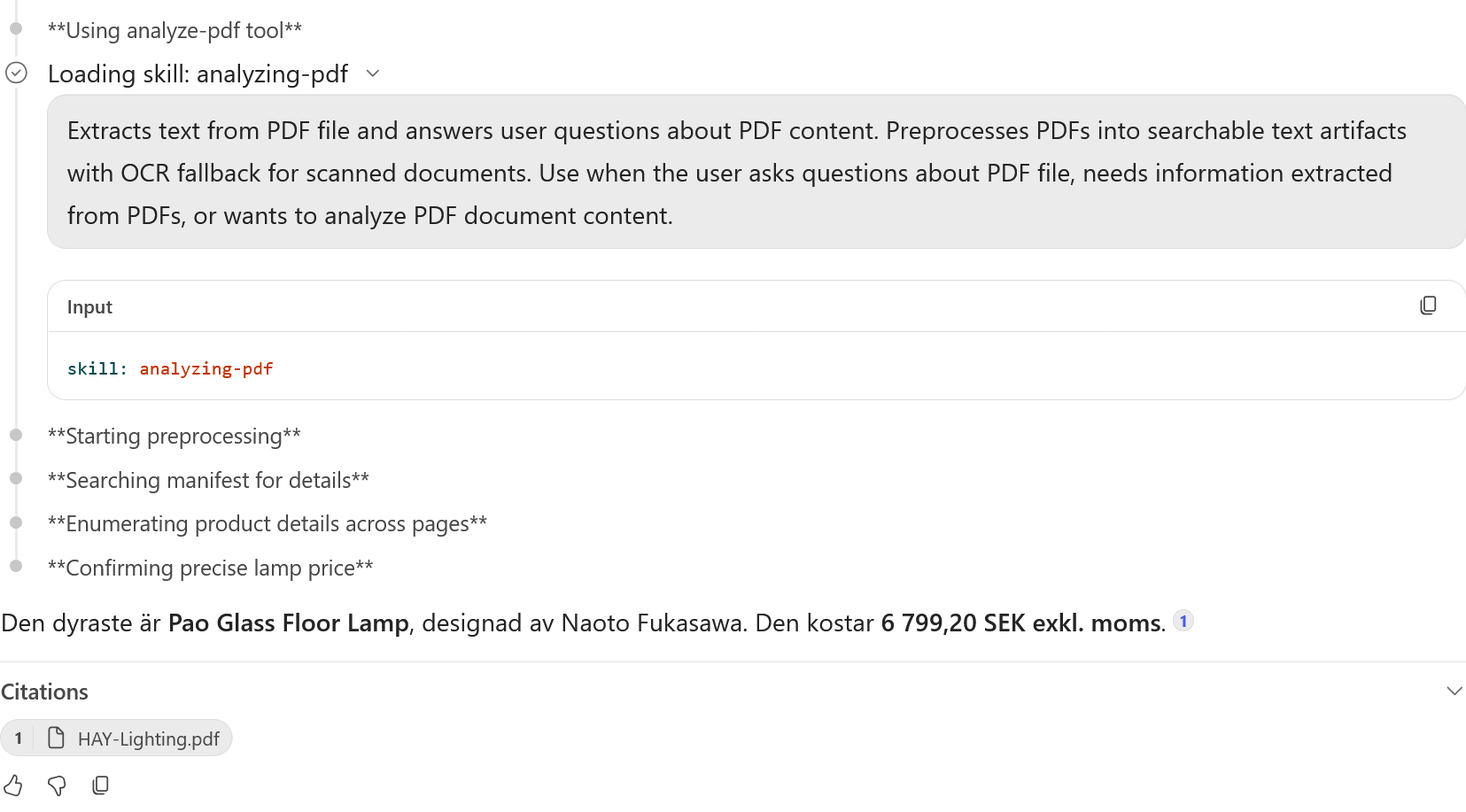
Two building blocks worked together, then. Knowledge found the document, and the skills decided the working order: search first, fetch the whole file when the excerpt is not enough, preprocess, verify. The skills that did the job here are the same kind of component you can write yourself, which takes us on to the next building block.
Skills
A skill is a reusable, task-specific capability. Tools let the agent fetch data or take actions, both in its own environment and in external services. A skill instead describes a way of working, through instructions, logic, and any supporting resources, that you can share and reuse across agents.
What a skill really captures is experience. A language model knows an enormous amount in general, but almost nothing about how your organization does things, because that knowledge is rarely written down. It spreads by word of mouth or through trial and error, which makes it practically impossible to train into a model. The open standard behind skills says the same thing about what a good skill should rest on:
“Effective skills are grounded in real expertise.”
If you instead ask ChatGPT or an agent to write the skill for you, without feeding in your own material, it rarely turns out well. It only has its general knowledge to draw on, and the advice comes out vague: “handle errors appropriately”.
In practice that means an experienced person describes how they work: the steps that succeed, the corrections they usually make, the formats in and out, and the project-specific facts the agent could not possibly know. Then you connect the tools needed to actually carry it out. That is why skills are worth learning to handle now. It is the most direct route to getting working experience into an AI system.
The best description of where skills belong among the other building blocks comes from Microsoft's Customer Advisory Team:
“Knowledge gives the agent facts, tools give it reach, and a Skill gives it the situational know-how to use both well. And crucially, a Skill guides the agent, it does not straitjacket it.”
Source: Roel Schenk, Agents Have Skills Now
The format is deliberately simple: YAML front matter with a name and a description, plus instructions in Markdown. That makes them portable, and they can be written in any text editor and uploaded.
A skill can also be uploaded as a zip file, and then it can bring files along beyond the instruction itself. Scripts are executable code that ships with the skill: the instruction text explains when and why something should be done, and the script does the actual work. The agent reads the instruction, runs the script, and continues in the skill, instead of writing the same code from scratch every time. Reference files are material that loads only when needed, for example a schema description or a list of error codes, and assets are templates and other static resources. The point of the split is context: the name and description are always in view, the instructions load when the skill activates, and the rest is fetched only when the agent actually needs it.
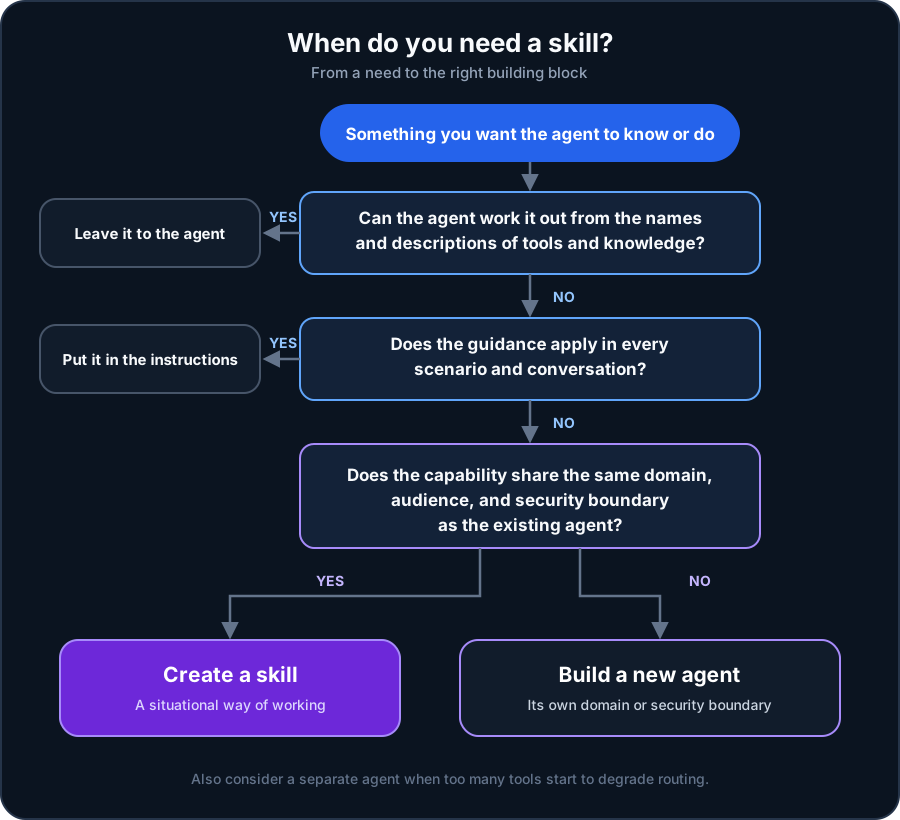
Instruction or skill? The rule is simple. If it applies in every conversation, for every scenario, it belongs in the agent's instructions. Tone, role, and always-on guardrails hold a hundred percent of the time and should sit in the context. If it applies only to specific scenarios, it should be a skill.
A common situation when you start working with skills, then, is that the instructions need breaking up. That gives four benefits, of which the first two apply almost always:
Manageability
Instead of an ever-growing lump of instructions, each skill becomes a focused unit you can review and version on its own.
Context management
Skills load on demand. The agent keeps only names and descriptions in view. Ten skills cost ten short descriptions, not ten full instruction sets per turn.
Accuracy
A skill can carry detailed guidance on which tool to use and how. A real effect, but dependent on the use case. Evaluate instead of assuming.
Speed and cost
Fewer searches, tool calls, and reasoning loops give lower latency and lower cost per conversation. Also case dependent.
Do not write down what the model already knows. A skill should add what the agent would not have managed on its own, meaning your conventions, your edge cases, and the tools that should be used. It does not need to explain what a PDF is or how a for loop works. The standard behind skills suggests a simple test before you write anything in: would the agent get this wrong without this sentence? If the answer is no, the sentence goes, because every line in the skill competes for room in the context when it loads. The exception is when you do the general thing in your own particular way, because then the deviation is exactly what is worth writing down.
Skill or new agent? The instinct before skills was to build a new specialized agent per task. The simplest rule of thumb is to stay within the domain: if you have an HR agent, you build five HR skills in it, not five small HR agents under it. A finance skill does not belong in the HR agent, though. That calls for a separate finance agent with its own finance skills. What decides it is whether the capability would stand on its own, with a different audience behind a different security boundary. There is one more reason: once a single agent has been given too many tools, accuracy starts to degrade, and then more skills do not help, the work needs splitting up.
The name should be specific, the description decides. HR Leave Eligibility Triage says something, HR Help does not. But the description is what the orchestrator actually matches against when it decides whether to call the skill in, so that is where the work sits. A good description says both what is included and what is not, for example that it covers leave rules and documentation but not payroll. If the skill is called in too often, the description is too broad. If it is never called, it is too narrow, or it does not use the words users actually type.
A skill is a trust surface. Because it shapes the agent's behavior and can bundle scripts, every skill you did not write yourself should be treated as untrusted code. Review it before you add it, and look specifically for prompt injection, instructions to misuse tools, and anything that does not match what it claims to do.
The harness also ships with eight built-in skills. They are the best concrete example of what a well-written skill looks like, and they are covered in inside the GitHub Copilot harness.
Tools
Tools are what let the agent do something other than answer questions, meaning interact with the world around it. Microsoft divides them into three types, and it is worth noting that workflows count as a tool type rather than as something alongside them.
Connectors
Proxies around APIs. Standard connectors are included in every plan, premium ones in selected plans, and custom ones can be built either from scratch or from an OpenAPI definition.
MCP servers
For custom or internal services. Provide resources, tools, and prompt templates, and Copilot Studio mirrors changes on the server dynamically.
Workflows
For multi-step, automated, and deterministic processes the agent can run on demand.
Choosing between them is not particularly subtle. If a ready-made connector to the service exists, you use it. If it is your own service, you build an MCP server. If something has to happen the same way every time, it is a workflow.
For MCP, the primary transport protocol is Streamable, the older SSE support is being phased out, and authentication can be none at all, an API key, or OAuth 2.0. Because the connections build on Power Platform, access falls under the organization's data policies.
MCP is also the route that has become the most common in practice, for two reasons. Many organizations have already set up their own MCP servers against their internal systems, and such a server is connected to an agent by giving a URL, authentication, and a name and description that the agent sees. If you want to build a new one, there is Microsoft's guide, and the connection flow in the new experience describes the steps for adding an existing one. Coverage of Microsoft's own services is good too: the most used server in this context is Work IQ, which sits under the umbrella name Microsoft IQ and gives the agent work context, business data, and app signals from Microsoft 365. It has a walkthrough of its own.
One piece of advice that is easy to skip: check the name and description of every tool the server exposes before you rely on it. If a tool lacks a clear description, answers that involve it become less reliable, and the right fix is to ask whoever built the server to rewrite the description.
One limit is worth noting: MCP servers count against the total number of tools the agent can host, and the number of servers that can run at the same time in one conversation is capped. Keep the count small and remove what you do not use.
Workflows: The Deterministic Tool Type
Workflows are the third tool type and at the same time a design surface of their own, powered by the same harness. A flow consists of a trigger and at least one action. The trigger can run manually, on a schedule, or from an event, which is also the answer to how an agent can be started without a human typing anything.
The actions come in four types: AI functions that can generate text, process documents, run a prompt against a model, and call an agent, human involvement for steps that require someone to step in, built-in tools for loops, branching, data operations, date and time functions, and child flows, and connectors to Microsoft 365, third-party services, and custom connectors.
The link back to the agent goes through a particular trigger. A flow that uses When an agent calls the flow can be added as a tool in an agent, which makes the relationship two-way: agents can run flows and flows can call agents. Human involvement is also the only explicit human-in-the-loop mechanism in the whole material, which makes it central if you need approval steps.
On cost, flows behave differently from agents. Every action a flow runs consumes capacity, and once the prepaid capacity runs out, new flow runs are blocked while running ones finish. But testing a flow, both in the designer and from the agent's test chat, consumes nothing.
Files the Agent Creates
That the agent creates files is not something you turn on or configure. If it needs to write a file to complete a task, it does so and attaches it to the answer.
The user gets a file card below the message with the file name, a preview, and a download button, and the cards render in every channel with that channel's own file interface. The file lives on in the conversation, so the user can say make the chart taller or translate this into French and get an updated version.
Two numbers apply here. Files are capped at 10 MB per file, and a file that exceeds the limit is not returned at all even though the agent keeps working. Ask it to split the output into several files in that case. And the files remain for 28 days after the last activity in the conversation, the same number as for memory.
Memory
Each user's memory sits in a dedicated folder in Microsoft-managed storage. The agent captures signals during the conversation, saves them as files, and applies them in later interactions.

Memory is a toggle at the bottom of the components panel, then, and it is still marked as a preview. The screenshot is Swedish, where the label reads Minne and the badge Förhandsgranska.
The rules around it are unusually strict, in a way worth raising in a governance discussion:
Private to the user
The creator of the agent cannot see the users' memories. Neither can anyone else.
28 days
Without interaction, the user's memories are deleted from the agent automatically.
The user is in control
The memory portal lists everything that has been saved, with the option to delete. In chat, you can ask the agent to forget individual things.
Off in groups
User memory is turned off in group chats and Teams channels.
One pitfall is worth quoting verbatim, because it is easily read backwards:
“Turning Memory off doesn't delete stored memories. It only prevents the agent from using them.”
Source: Memory (preview)
Turning memory off therefore only stops the agent from using what has already been stored. Memory is also a preview feature, albeit described as a production-ready preview.
Model
The model is the brain that gets connected to the agent, meaning the part that does the reasoning. You change model in the components panel on the Build tab.
The models in the list come mainly from OpenAI by default, and they are usually the latest available, even if they sometimes sit a generation behind what was just released. Alongside them are models from other providers, which Microsoft calls external models: Anthropic, Mistral, and xAI. Anthropic's models are generally available and therefore usually show up in the list right away, while Mistral and xAI sit as experimental. What they have in common is that an administrator first has to turn on external models for the environment and then approve each provider separately.
Different models are built for different things. Some answer quickly and cheaply but do not handle equally hard tasks, others reason for longer and solve more complex problems, at the price of higher latency and higher cost. The agent performs better when the model matches what it will be used for.
Connected Agents
A primary agent can call other agents during a conversation, and the orchestration routes the request when it falls within a connected agent's domain. That enables modular solutions where each agent owns a domain, different teams can own different agents, and new capabilities are added by connecting an agent instead of inflating the instructions of a single one.
Three conditions apply. The primary agent has to be built with the GitHub Copilot harness, the connected one has to be as well and sit in the same environment, published and marked as available. And you have to either own the connected agent or have had it shared with you. Right now you can only connect agents built in Copilot Studio.
The routing follows the same rule as the rest of the article: name and description. Microsoft's advice is short and points at the most common source of error when several agents are connected.
“Write a clear, specific description for each connected agent so the orchestrator can accurately determine when to route requests to it. Avoid overlapping descriptions between connected agents.”
What It Costs
Both harnesses pay in the same currency. A Copilot Credit costs $0.01 on pay as you go, and the formula is simply the number of credits times one cent. The difference lies in how they are consumed.
The most surprising part
The standard harness starts billing after publishing. The GitHub Copilot harness charges from the moment you start building. Creating a solution with natural language, previewing, testing, and generating evaluations all consume credits.
There are two counterweights. Manual configuration in Build and Monitor consumes no credits, and testing a flow in the flow designer or from the agent's test chat consumes no capacity. That gives an asymmetry worth carrying with you: testing an agent costs, testing a flow does not.
For the new harness, consumption is calculated from the amount of agentic work, and Learn puts it bluntly:
“Copilot credits are charged for large language model (LLM) tokens, tools (including knowledge and MCPs), and the harness itself. Any experience that uses one of these consumes credits.”
Source: Overview of usage-based billing
Knowledge and MCP therefore count as tool usage when they are actually used. Many connected knowledge sources and MCP servers do not automatically make every turn more expensive. The cost depends on which resources the agent uses and how much work the task requires.
Microsoft's planning estimates per agentic task:
Light
Few sources, light reasoning, one output
100–300 credits · $1–$3
Medium
Many sources, structured reasoning, several outputs
300–500 credits · $3–$5
Heavy
Broad aggregation, deep reasoning, many outputs
over 500 credits · over $5
The numbers are explicitly illustrative, and actual consumption varies with the complexity of the task.
Three ways to pay. Pay as you go is tied to an Azure subscription and paid in arrears with no commitment, at $0.01 per credit. The Copilot Studio Capacity Pack gives 25,000 credits per month for $200 a month, billed annually. That works out to $0.008 per credit, meaning 20 percent below the pay as you go price, but unused capacity does not carry over to the next month.
For larger volumes there is the Copilot Credit Pre-Purchase Plan, a one-year prepurchase where the discount grows with volume:
| Tier | Copilot Credits | Discount |
|---|---|---|
| 1 | 300,000 | 5% |
| 2 | 1,500,000 | 6% |
| 3 | 3,000,000 | 7% |
| 4 | 15,000,000 | 8% |
| 5 | 30,000,000 | 10% |
| 6 | 75,000,000 | 12% |
| 7 | 150,000,000 | 14% |
| 8 | 225,000,000 | 17% |
| 9 | 300,000,000 | 20% |
Source: Microsoft Copilot Credits Guide, August 2026. Unused credits expire at the end of the term, and the plan cannot be cancelled or exchanged.
Two things are worth noting in the table. The discount starts only at 300,000 credits, meaning $3,000 of consumption, and it becomes meaningful only well above that. And because unused credits expire at the end of the period, prepurchasing is a question of how confident the forecast is, not only of how large the volume is.
The most important licensing difference. For the standard harness, qualified usage for internal, authenticated users is included in the Microsoft 365 Copilot license, under fair usage. The new harness does not get the same included usage. It requires Copilot Credits, full stop.
Consumption is tracked per agent on its Monitor page, and per environment and tenant in the Power Platform admin center. That is also where administrators allocate credits to environments, which ties cost control to the environment structure.
What Actually Differs From the Old One
Microsoft themselves sum up the differences like this:
| Considerations | GitHub Copilot harness | Standard harness |
|---|---|---|
| Best for | Complex, multi-step business processes | Rule-based agents and structured conversations |
| How it works | Reasons through a goal on its own, step by step | Follows the topics and rules you define |
| Recovers from problems | Retries and finds alternative paths automatically | Follows the paths you've built |
| Works with files | Creates, edits, and reasons over Word, Excel, PowerPoint, and PDF files | Not a focus |
| Skills and memory | Yes | Not a focus |
| Billing | Copilot Credits | See Copilot Studio licensing |
Source: Choose a harness. The table also has a column for the Copilot chat harness, left out here.
What does that mean, then? In short, that they are built for different things.
The standard harness gives predictability. You define topics and paths, the orchestration is configurable, and you know fairly precisely what the agent is going to do.
The GitHub Copilot harness gives momentum. The agent takes a goal and works its way toward it by deciding for itself which steps are needed and how they should be carried out, within the frames you have set.
Lifting your eyes from the list and looking at a few important practical differences, it comes down to four things.
Building agents is easier. You used to need topics, flows, and a fair amount of Power Automate to steer the agent correctly. Now the work is more about understanding what the agent should achieve, what information it needs to get there, and how it ought to go about it.
The agent works better with company data. The product catalog example above shows why: it can go to the document and read the whole thing instead of being limited to short excerpts. The old engine could also run code and process files, but one file at a time and without being able to follow up on the same file across several turns.
Real experience can be built in. With skills, ways of working that today live only in the heads of experienced colleagues can be packaged and reused, and without anyone having to write code.
The cost is generally higher. Usage is billed as work, and the meter starts as soon as you begin building.
Summary
The new Copilot Studio moves the work from drawing routes to describing conditions. That makes development faster and the agents more capable, but it also moves the cost earlier and makes the harness choice hard to change afterwards.
Three things to take away:
- the harness choice is made when the agent is created and has no officially supported direct migration, so switching normally means rebuilding
- skills are the right unit when something applies to specific scenarios, instructions when it applies to all
- billing starts when you start building, and knowledge and MCP count as tools and cost money
If you want to go deeper, there is inside the GitHub Copilot harness on the harness, the sandbox, and the built-in tools, and Work IQ MCP on the most common connection to Microsoft 365. For the fundamentals, there are AI agents and agentic systems and AI automation and workflows.
About the material. The details come from Microsoft Learn, the Copilot Credits Guide from August 2026, and the Copilot Studio Licensing Guide from the same month. The section on skills also builds on Agents Have Skills Now by Roel Schenk on Microsoft's Customer Advisory Team, which is the most thorough walkthrough of when something should be a skill and when it should not. The new Copilot Studio is developing quickly and several of the features above are previews, so check numbers and limits against current documentation before using them as a basis for decisions.