What Is AI Automation? And When Are Workflows Better Than AI Agents?
Published March 15, 2026 by Joel Thyberg
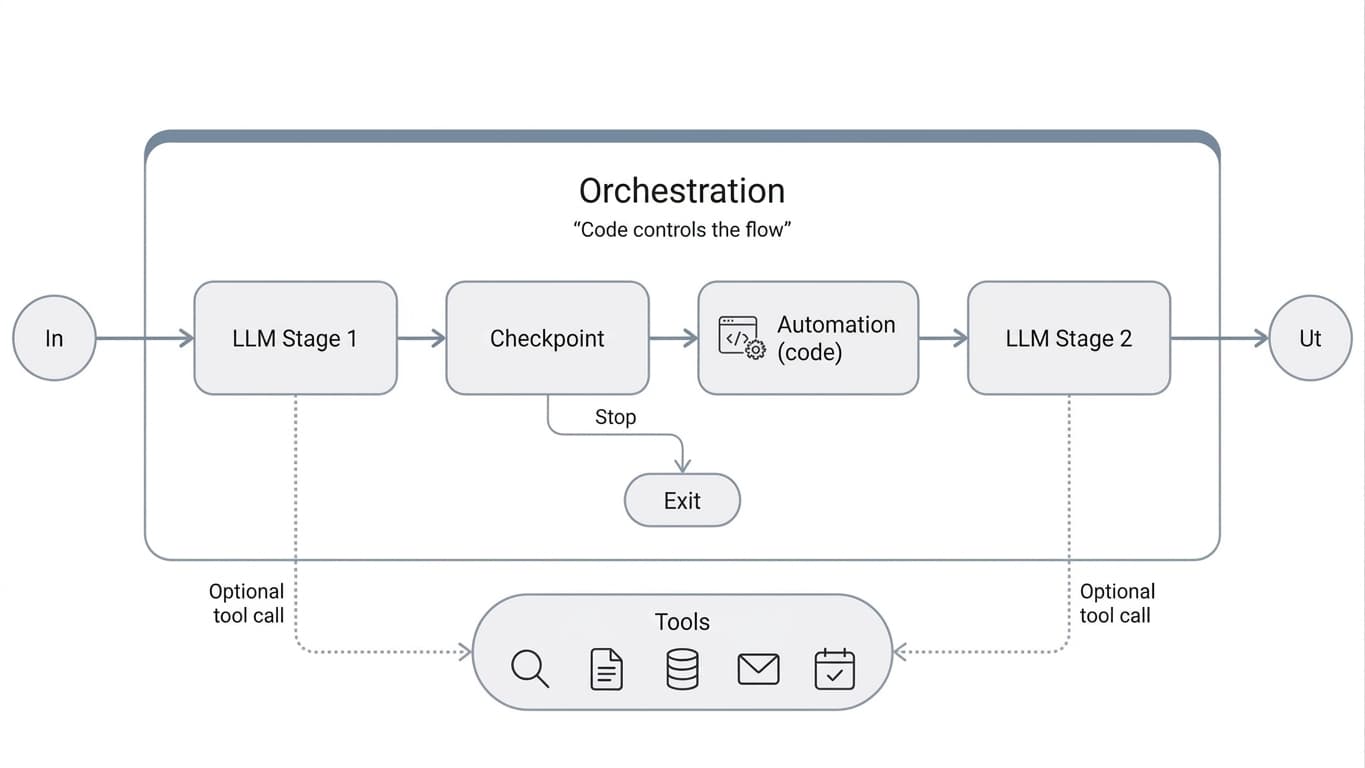
AI automation is one of the most practically useful ways to create value with language models. It is also an area where many terms get mixed together. In some contexts, words like automation, workflow, agent, orchestration, and agentic systems are used almost as if they meant the same thing. They do not.
The short version is this: AI automation usually means workflows. These are controlled flows where language models are used in certain steps, while the overall process is still predefined. That makes AI automation a kind of middle ground. More flexible than traditional rule-based automation, but more controlled than a free-form agent.
If you first want to understand the models themselves, start with the fundamentals of language models and LLMs. Here, the focus is instead on how they are used inside controlled workflows, when that is the right choice, and how that differs from AI agents.
Short answer
AI automation usually means AI is used inside a predefined workflow. The flow is controlled, but some steps can interpret, classify, summarize, or generate content.
Why it matters
It is often the best path when the process is already known, but one or more steps are too language-heavy, unstructured, or nuanced for classical automation.
Common misconception
That AI automation always means autonomous agents. In practice, many of the best solutions are far more controlled than that.
What Does AI Automation Mean?
AI automation becomes relevant when a workflow is already clear enough to be described step by step, but some sub-steps still require interpretation, language understanding, or judgment. That can mean reading inbound email, classifying cases, extracting information from documents, suggesting replies, summarizing material, or routing a case onward.
What makes AI automation interesting is not that the whole process becomes free and self-directed. Quite the opposite. The strength often lies in the fact that the frame is fixed, while AI is used in the steps where traditional rules are not enough.
AI automation in practice
Deterministic orchestration around dynamic AI steps
This is often the most robust form of AI system in real businesses. The trigger is known. The steps are known. The rules are known. But one or more steps need a language model to work well.
Trigger
New email, new document, or new form
AI step
Classify, extract, summarize, suggest
Control
Rules, validation, approval, integration

The Difference Between Traditional Automation, AI Automation, and AI Agents
The clearest framing I have seen here comes from Anthropic's engineering article on agentic systems. They use agentic systems as an umbrella term, but they clearly distinguish between workflows and agents:
- Workflows are systems where language models and tools are orchestrated through predetermined code paths.
- Agents are systems where the model more dynamically controls its own process and tool use.
That is a very useful distinction, and it fits well with how AI automation is used in practice.
Three levels of automation
Traditional automation
Exact rules, low interpretation
Best when the rules can be described exactly in code. If X happens, do Y. Works very well for fixed integrations, notifications, and database-driven rules.
AI automation and workflows
Controlled flow, smarter sub-steps
Best when the process is known, but some steps require language understanding or judgment. This is often where the greatest practical value exists today.
AI agents
Dynamic choice of path and tools
Best when the right path cannot be fixed in advance and the model needs to plan, choose tools, and adapt continuously as the work unfolds.
How Is It Different from Traditional Automation?
Traditional automation works best when the input is clean, structured, and predictable. In that case, traditional rules, integrations, and decision trees are often enough.
AI automation is needed when the flow is known at a high level, but the input is not clean or structured enough for classical logic alone. That can include:
- free-text fields
- emails written in many different styles
- PDFs and other documents
- language that needs to be interpreted in context
- tasks where probabilistic judgment works better than exact rule matching
That is why AI automation is often a strong complement to traditional automation, not a replacement for everything.
How Is It Different from AI Agents?
The simplest rule of thumb is this:
- If the process can already be described clearly step by step, start with a workflow.
- If the process requires the model to choose the next step itself, use tools freely, and re-plan while it works, then you are moving toward an agent.
That is also why workflows are often the better first step in organizations where control, repeatability, testability, and accountability matter.
When Is AI Automation the Best Fit?
AI automation is best suited when the process is clear at a high level, repeats often, and can still be described as a controlled flow. The question is therefore less whether AI should control everything, and more where in the process the language model is actually needed.
Typical characteristics
- the process can be described in clear steps or control points
- input can be normalized, validated, or routed onward along the way
- some sub-steps require interpretation, classification, extraction, or generation
- rules, logging, traceability, or approval are needed around the AI step
- the same core flow repeats even if the content varies between runs
When a workflow becomes too rigid
- cases vary heavily from one situation to another and lack a stable structure
- the next step must be chosen dynamically during execution
- the model needs to plan across several steps on its own
- tools or sub-tasks must be chosen freely depending on the situation
- the architecture starts to look more like an agent than a pure workflow
Five Common Workflow Patterns
There are several proven ways to build AI automation. Here are five of the most useful patterns in practice.
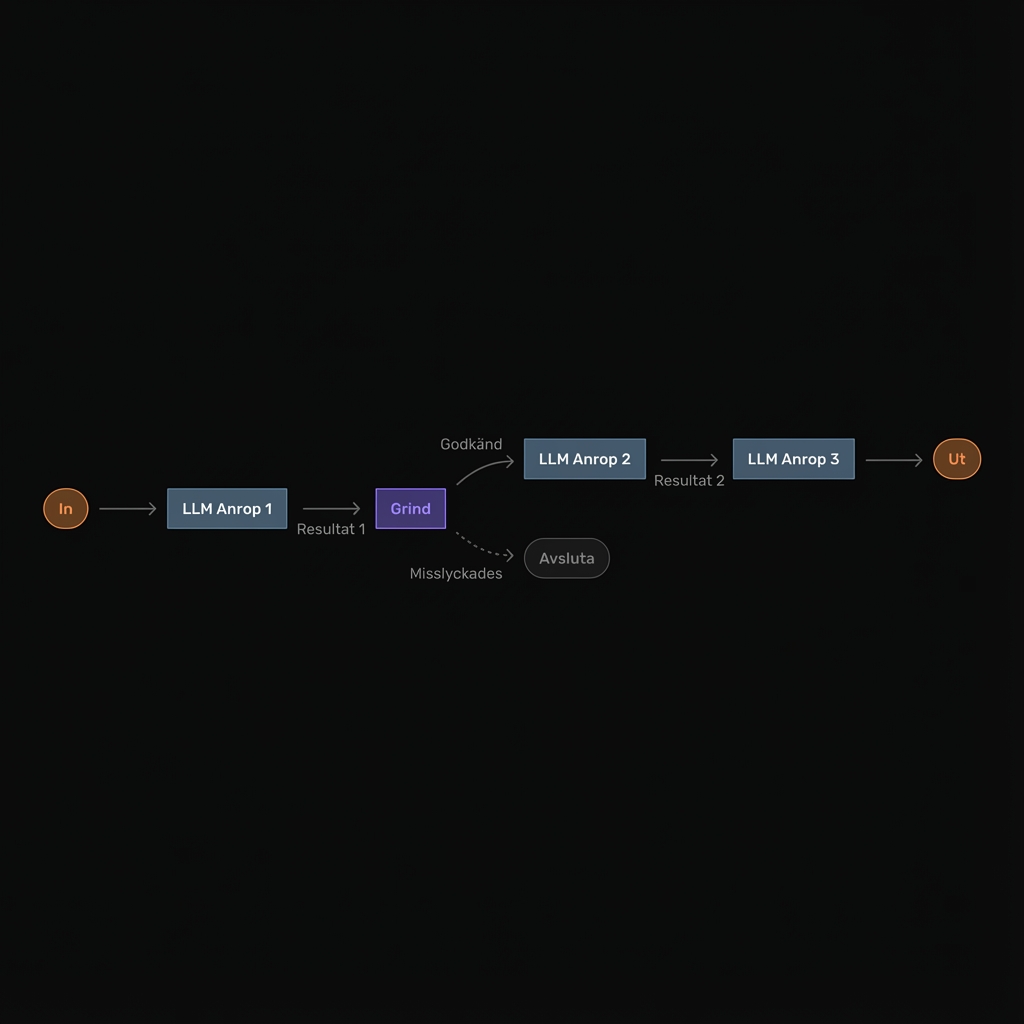
1. Prompt chaining
In prompt chaining, a task is broken into a sequence of steps where each AI call builds on the result of the previous one. Between steps, you can add checks, rules, and validation.
This is often the simplest and most predictable workflow pattern.
Core pattern
Break the task into clear steps
Good when you want control over order and quality, for example first extracting facts, then summarizing, then writing the result in a fixed format.
- write a draft, review it, and then improve it
- read documents, extract fields, and then create structured output
- place gates between steps so errors are caught early
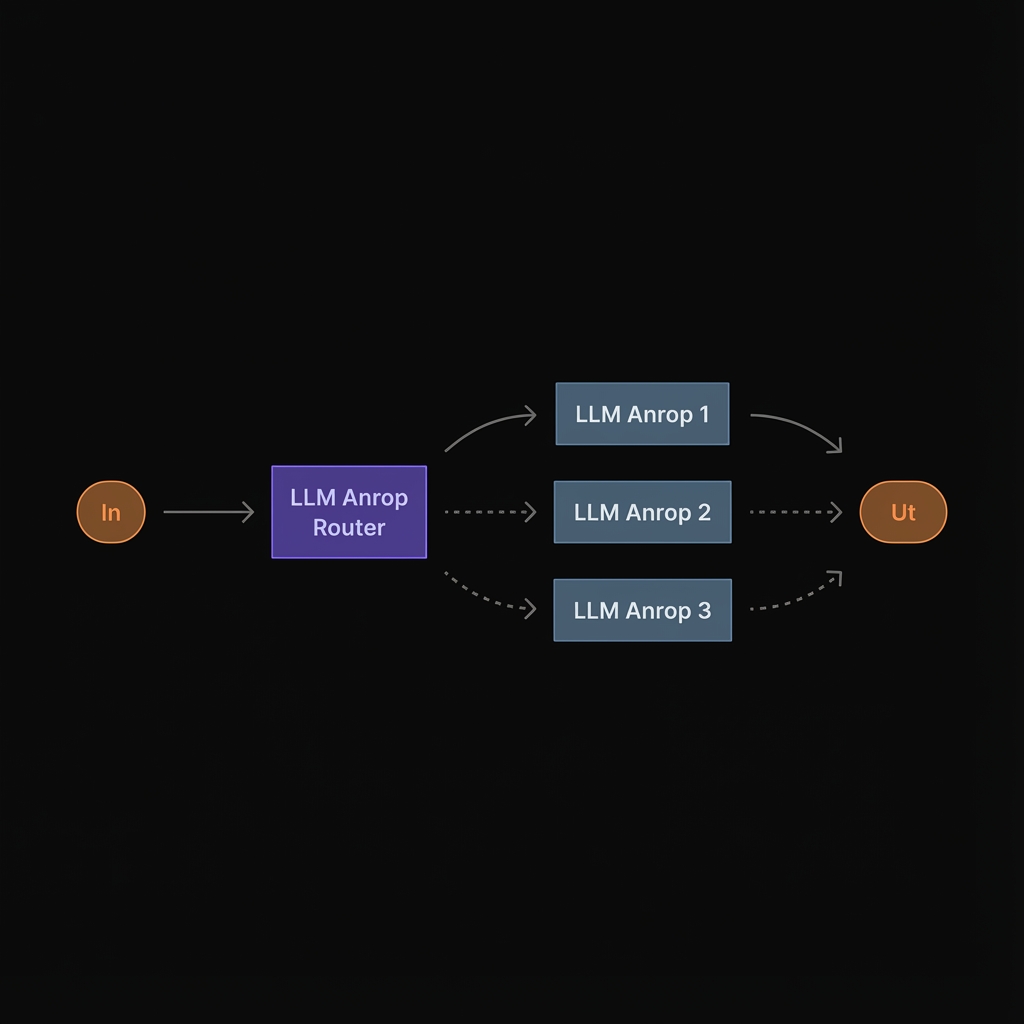
2. Routing
Routing means a first step classifies the input and then sends the case down the correct specialized path. You can use different prompts, models, rules, or integrations depending on the case type.
Core pattern
Send different cases to different logic
Good when not all input should be handled in the same way. This reduces both cost and error rates because each route is optimized for its own task type.
- customer service, refunds, technical support, invoice questions
- simple cases to a cheaper model, difficult cases to a stronger one
- different rules and integration steps depending on classification
3. Parallelization
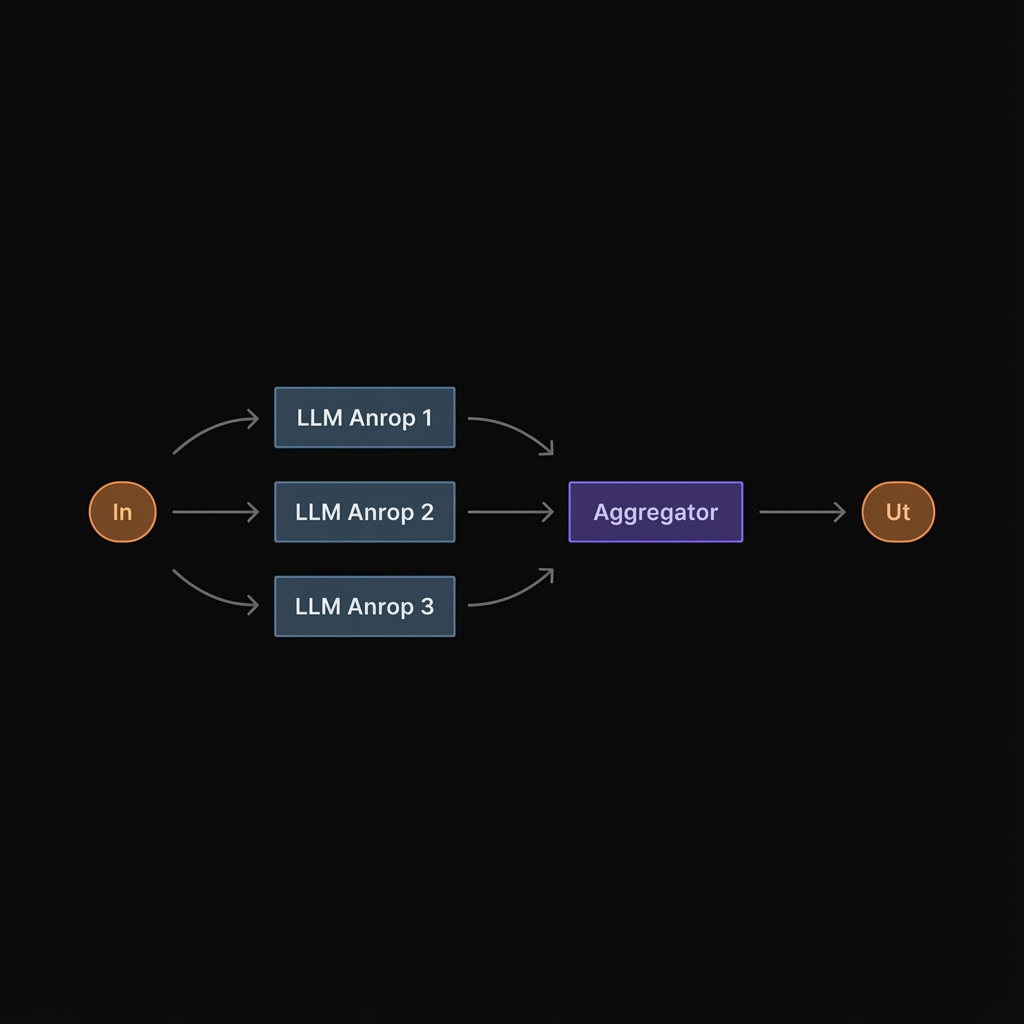
In parallelization, several AI steps run at the same time. This can be used either for speed, for example if different parts of a document can be analyzed in parallel, or for quality, for example if multiple assessments are made and then compared.
Core pattern
Multiple assessments at once
Good when you want to save time or get several perspectives without giving up overall control of the flow.
- split larger material into sections analyzed in parallel
- let multiple prompts review the same answer from different perspectives
- use voting or consensus for more sensitive tasks
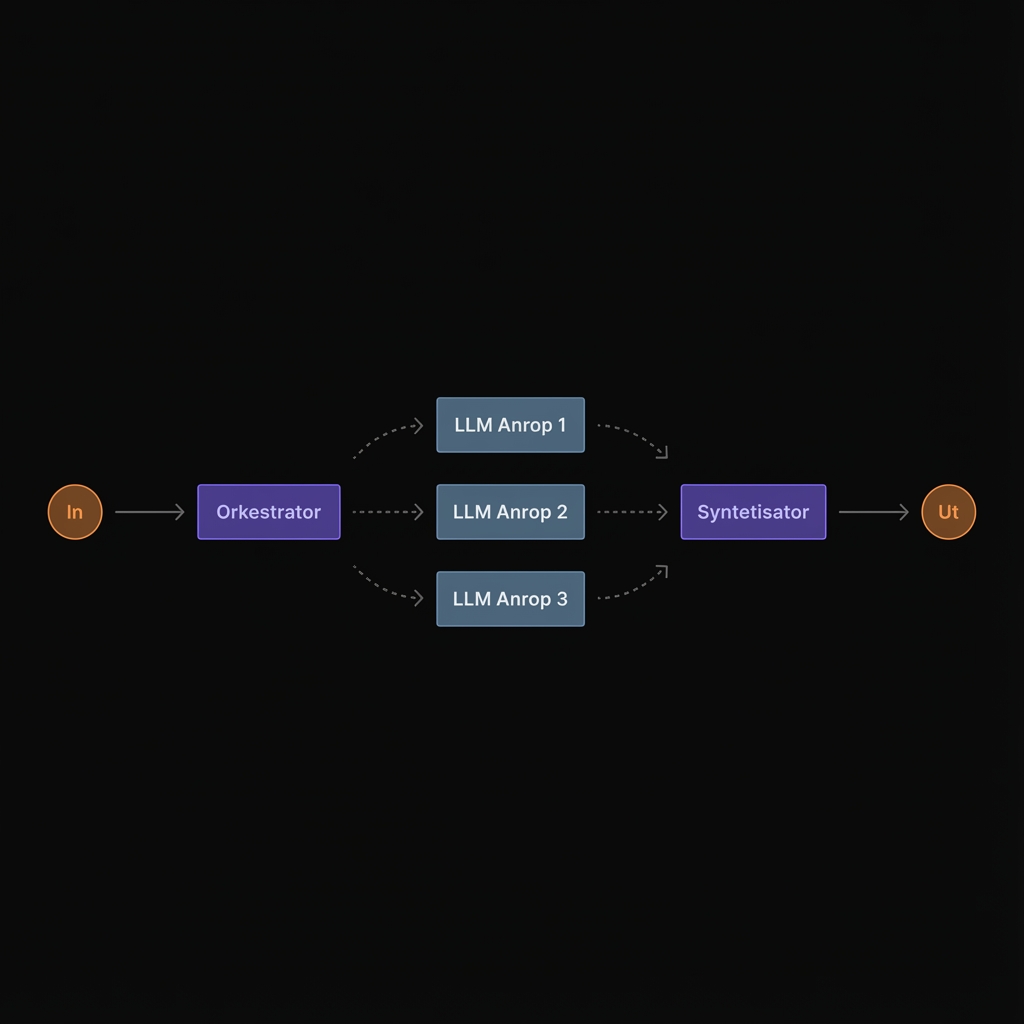
4. Orchestrator-workers
In this pattern, there is still an overall workflow, but one step gets more flexibility. A central model breaks down the task and delegates sub-jobs to other specialized workers. That makes the pattern more dynamic than the previous ones, but it is still not the same thing as a free-form agent.
More advanced pattern
Flexibility inside a controlled architecture
Good when you know that several sub-tasks must be solved, but not exactly which ones every time. This fits more complex document processing or research-like work.
- a central model breaks the job into parts
- specialized workers solve each part
- the results are then combined into a final answer
5. Evaluator-optimizer
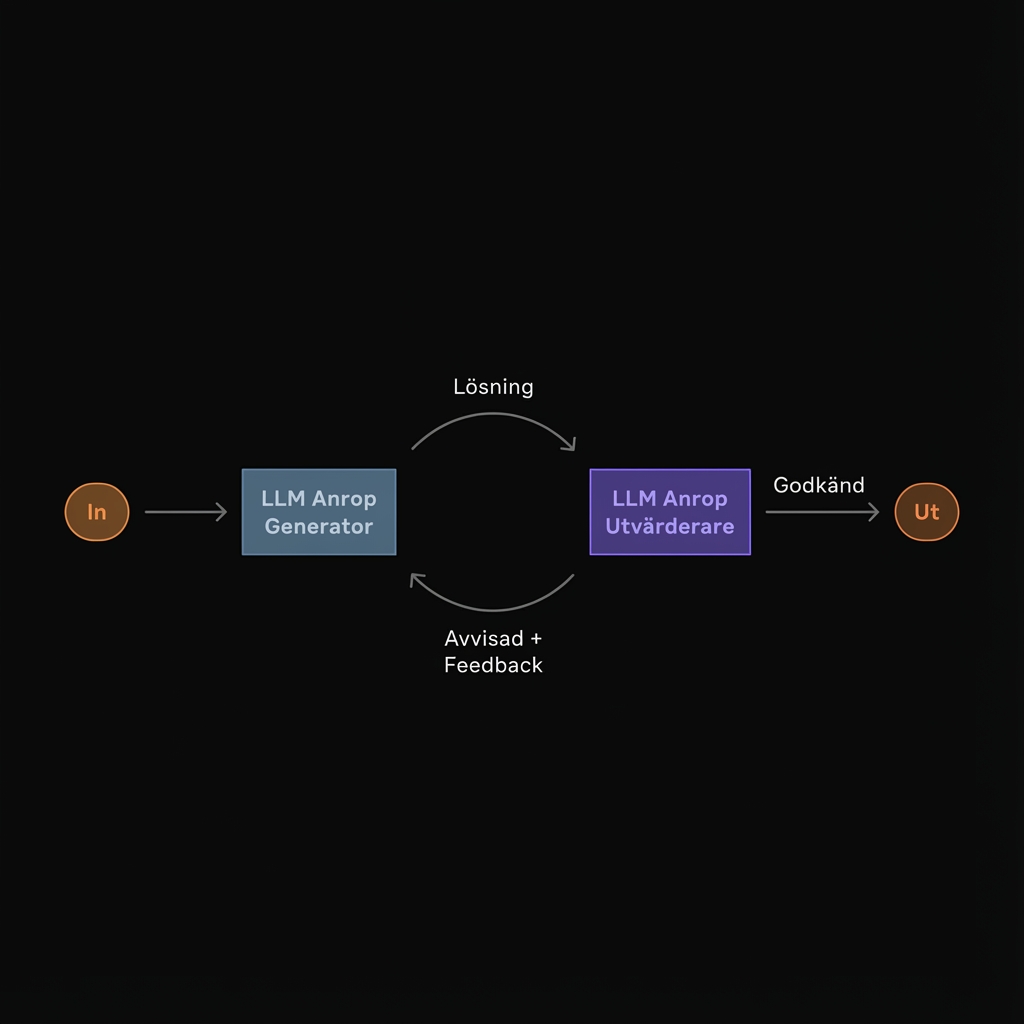
Here, one model first creates a result, and another model reviews it against clear criteria. The answer is then improved in one or more iterations. It resembles a controlled feedback loop.
More advanced pattern
Iterative improvement with clear criteria
Good when quality can be raised through feedback and when there are clear criteria for what counts as a better result.
- proposals are reviewed before moving forward
- answers are improved step by step toward a defined target
- useful in more demanding writing, analysis, and complex review
Why Workflows Are Often the Smartest Middle Ground
There is a reason workflows have become so central. Modern language models are strong at language, interpretation, and generation, but they are still not stable enough to always have full control over the entire process.
AI automation solves that by combining two things:
- determinism in the orchestration, meaning clear steps, rules, and integration points
- flexibility in the AI parts, meaning classification, extraction, summarization, routing, and generation where regular code would otherwise be too rigid
That is exactly why many of the most valuable business solutions today are not pure agents, but well-designed workflows with AI inside them.
How Does This Connect to Language Models?
Every workflow above is built on the same foundation: a language model that can interpret input and produce useful output.
In practice, three questions often determine how good an AI automation system becomes:
- which model you use
- what context the model gets
- how tightly the workflow itself controls what is allowed to happen
That means it is rarely just "the AI" on its own that determines quality. The architecture around the model matters just as much.
Summary
AI automation usually does not mean free autonomous systems. It means controlled workflows where language models are used where they actually add value. That makes workflows a very practical middle ground between classical automation and AI agents.
For practical use, three things matter most:
- workflows work best when the process can be described in clear steps
- AI creates value mainly in the sub-steps where language, interpretation, or judgment is required
- quality is rarely determined by the model alone, but also by context, rules, and how the flow is orchestrated
If you want to understand when a system needs more dynamism than a workflow, read our deeper guide on AI agents. If you want to see how we describe AI automation in a more implementation-oriented way, see our page on AI automation as a service.