The GitHub Copilot Harness: A Deep Dive Into Copilot Studio's New Engine
Published August 19, 2026 by Joel Thyberg
Microsoft recently made its new engine for building agents in Copilot Studio generally available. In the overview of Copilot Studio's three harnesses, Microsoft describes it as the most capable option, built for reasoning-heavy agents and workflows meant to complete complex business processes.
The new engine is called the GitHub Copilot harness. The name raises two natural questions. What is a harness, and is there a technical connection to GitHub Copilot?
What Is a Harness?
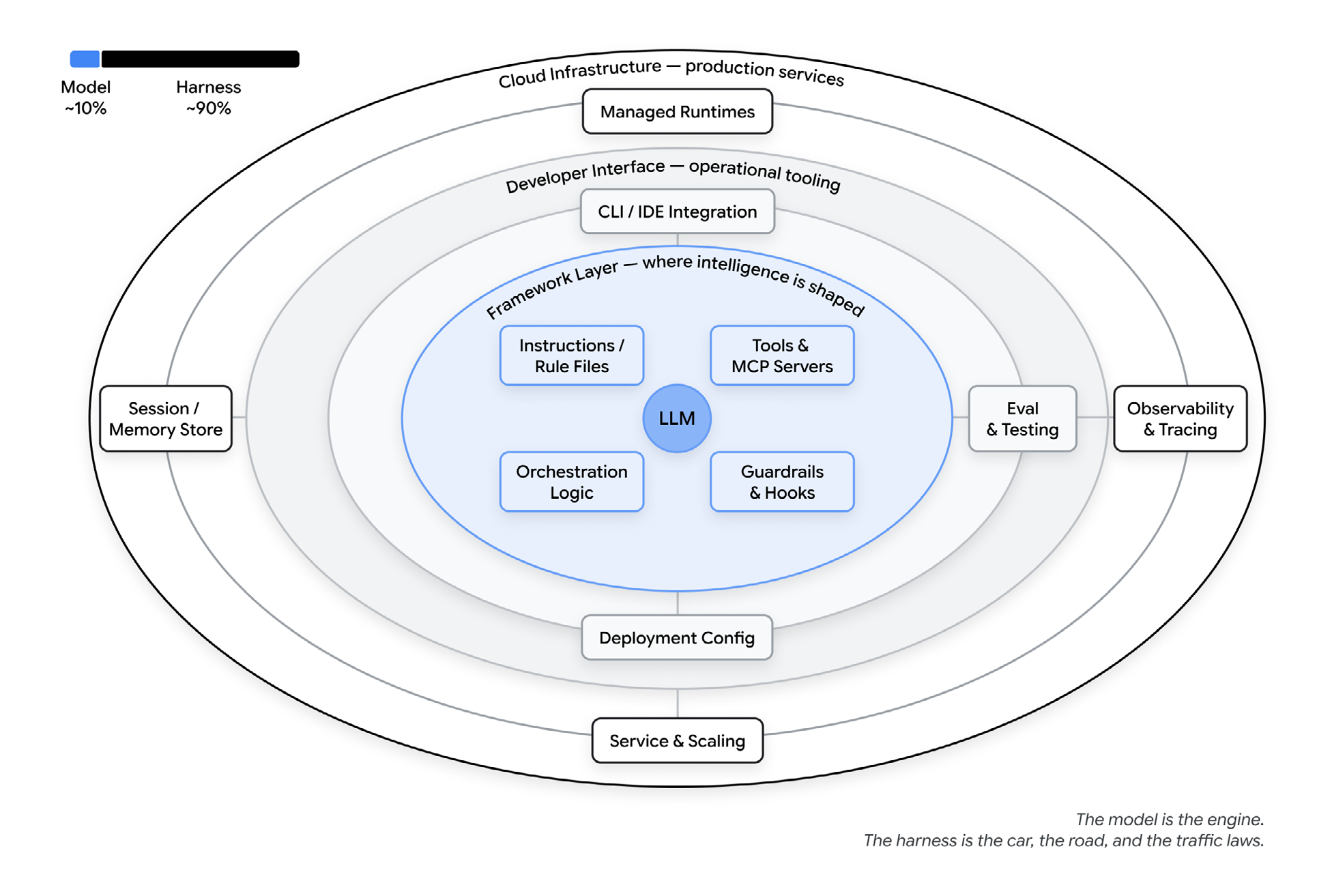
An agent can be described simply as model + harness. The model provides the intelligence and the reasoning. The harness is all the software and infrastructure around the model that decides what it gets to know, what it can do, how actions are executed, and how the agent loop is steered.
That means instructions, skills, tools, orchestration, guardrails, observability, and the execution environment are all parts of the harness. They are not separate main systems standing next to it.
Is There a Connection to GitHub Copilot?
Yes. Microsoft's and GitHub's documentation together give a fairly clear map of how the technology fits together.
The GitHub Copilot Agentic Harness
GitHub describes the GitHub Copilot agentic harness as a single shared component of the GitHub Copilot SDK. The same component is used in GitHub Copilot CLI, the GitHub Copilot App, Copilot code review, and several other experiences at GitHub and Microsoft.
“The GitHub Copilot agentic harness is a single shared component of the GitHub Copilot SDK, which powers the GitHub Copilot CLI…”
Source: GitHub Blog, Evaluating performance and efficiency of the GitHub Copilot agentic harness
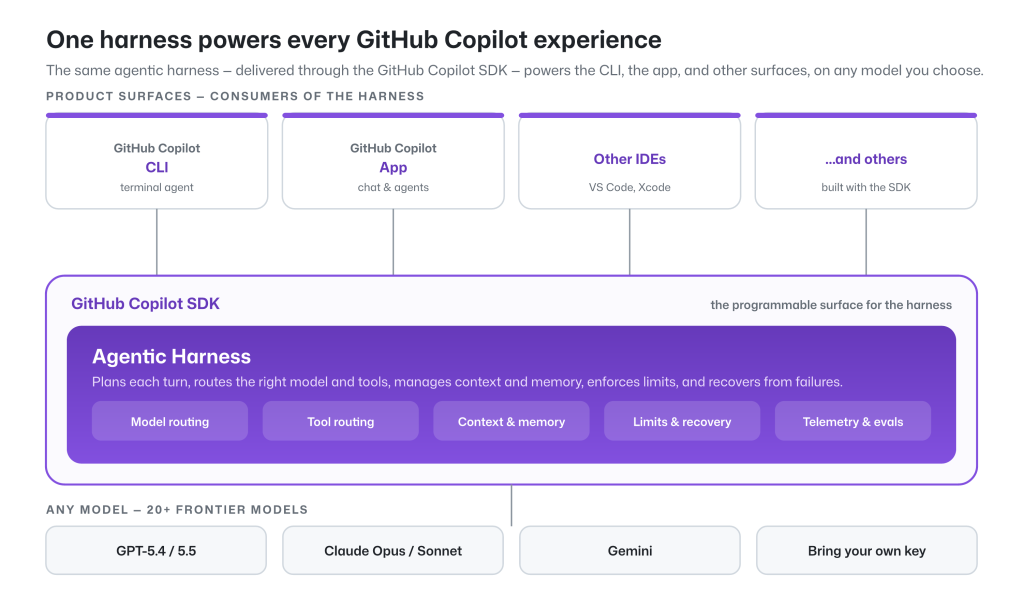
What matters here is that GitHub describes the harness as a shared technical component, not as something that belongs to Copilot CLI alone.
The Connection to Copilot Studio
Microsoft then makes the connection to the new Copilot Studio experience explicit:
“The new GitHub Copilot harness, which uses the power of GitHub Copilot SDK to automate complex, agentic business processes.”
Source: Microsoft, More powerful agents and workflows for autonomous business processes
That means Microsoft explicitly ties the GitHub Copilot harness in Copilot Studio to the GitHub Copilot SDK.
Earlier, Microsoft had already described the new orchestrator as “built on a new coding harness and CLI layer”. At the same time, Microsoft highlighted stronger instruction following, long-running tasks, and recursive execution. The orchestrator was also described as capable of handling large amounts of content and producing advanced file outputs. Read Microsoft's introduction of the new orchestrator.
Taken together, the documentation gives roughly the following relationship:
An Important Distinction
It is easy to conflate two different things here. Microsoft Agent Academy describes the harness in Copilot Studio as “the runtime environment used by the agent” and separates it from “the GitHub Copilot coding assistant”.
GitHub Copilot coding assistant is the finished developer product used in VS Code and elsewhere. Copilot Studio's GitHub Copilot harness is the agentic system around the model in Copilot Studio. Agent Academy therefore uses runtime environment in a broader sense than just the sandbox where code runs.
The distinction does not contradict the SDK connection. The products and the user experiences differ, while Microsoft documents that the Copilot Studio harness uses the GitHub Copilot SDK. What is not publicly documented is whether Copilot Studio runs exactly the same binary, or exactly the same implementation of the harness, as GitHub Copilot CLI.
Although the documentation gives a clear picture of the kinship, Microsoft says considerably less about what actually sits behind the scenes. Which tools does the agent get? What can run in the sandbox? Which libraries and ready-made instructions ship with it from the start? This article opens that part of the harness and goes through what could be observed in a real run. Custom connectors, MCP servers, and other add-ons are left out so the default environment becomes visible.
The material combines Microsoft's description of the sandbox with our own measurement of a running agent. The measurement was made on 18 August 2026 and carries the fingerprint sha256:8557dcbd…. It shows what could be observed in that environment at that moment. It is not a promise about how the service will always look.
Snapshot · 2026-08-18
The report separates what could be observed directly, what comes from Microsoft's documentation, and what is our interpretation of the findings.
3.12.9
Python
99
Python packages
12
built-in tools
8 + 1
built-in skills + ours
The Sandbox Is the Workbench
The sandbox is the part of the overall harness where the agent can work with code and files under controlled conditions. It is an isolated and constrained execution environment: the place where actions run and where the limits on what they may reach are enforced.
Why is that environment needed? Language models are good at writing code, but less reliable when they have to calculate exactly or generate large, structured files directly. Microsoft sums the problem up well in its walkthrough of the sandbox: “A model predicts a plausible result; it doesn't compute one.” An answer that looks like a valid Excel or Word file does not have to be one.
The sandbox bridges that gap. The GitHub Copilot harness can let the model write code, run it in the container, read the result, and use the feedback for the next attempt. Microsoft describes the environment as a temporary container with Python, local files, preinstalled libraries, and shell tools.
That means a total can be calculated with Python, a spreadsheet can be built as a real .xlsx file, and a document can be opened, preprocessed, and checked before the agent answers.
The sandbox security boundary
Code may run. The network is closed.
Microsoft describes the boundary clearly in its technical walkthrough: “The sandbox has no outbound network path.” An installed networking library therefore does not mean the code can call an API.
Inside the sandbox
- 01Python 3.12.9 and local working files
- 02Preinstalled libraries for documents, data, and images
- 03Shell tools for running, reading, and iterating
- 04Temporary storage, not a permanent file archive
Controlled paths out
Connections the maker adds in the Copilot Studio build view.
- Knowledge sources
Pulls content from SharePoint, Dataverse, websites, and databases, for example. - Tools and MCP
Calls external services, APIs, and workflows to read data or take action.
In the build view, Knowledge and Tools are therefore the surfaces where the maker brings in external capabilities. They should not be confused with the internal default tools the harness itself uses to search, read, edit, and run code.
The network boundary applies to the sandbox, not to the whole harness. The harness can still use knowledge sources and tools that sit outside the container. External calls travel through the paths the organization has configured and can therefore fall under the platform's data policies and other governance.
The temporary workspace is not a permanent file archive. A file that has to live on must be handed to the user or saved with a configured tool. The agent's memory does not make the sandbox workspace persistent between conversations.
The Python Packages Show What the Workbench Is Built For
The measurement found 99 installed Python packages in the sandbox execution environment. The inventory is particularly strong in documents, data analysis, visualization, and image processing. Those are exactly the areas where it pays to let code do the work instead of asking the model to guess the result.
Office files
python-docx 1.2.0
openpyxl 3.1.5
xlsxwriter 3.2.9
python-pptx 1.0.2
PDF and OCR
reportlab 5.0.0
pypdf 6.15.0
pdfplumber 0.11.10
rapidocr-onnxruntime 1.4.4
Data and charts
pandas 3.0.5
numpy 2.5.1
matplotlib 3.11.1
plotly 6.9.0
This shows which building blocks were available, but not which library the agent picks in any given run. The safe conclusion is that the execution environment contained preinstalled libraries for creating, reading, and processing the file formats Copilot Studio says it supports. They should not be confused with the harness's internal tools, which the agent calls to read files or run commands, for example.
Two packages stand out for a different reason:
dracarys0.1.0github-copilot-sdk1.0.7
The presence of both packages is observed. The report describes dracarys as part of Copilot Studio's enhanced orchestrator and github-copilot-sdk as a way to drive GitHub Copilot CLI over JSON-RPC. Those descriptions come from the measurement tool's curated package catalog, not from the packages being present as such.
The github-copilot-sdk finding fits the documented SDK connection well. It still does not prove that Copilot Studio runs the same binary as GitHub Copilot CLI, or that this particular installed Python package sits in the active call chain. The package list shows what is in the environment, not the whole architecture around it.
Twelve Tools Reveal the Coding Agent Heritage
The measurement showed twelve internal default tools. Eleven were captured with a complete schema. For list_bash, only metadata from the tool listing was available, so the description of that particular tool rests on weaker evidence.
Instead of one long list, the structure is clearer if the tools are grouped by what they do:
Running and following processes
bash · list_bash · read_bash · stop_bash
bash runs synchronously or asynchronously. The three session tools find active runs, fetch new output, and stop the entire process tree.
Finding and reading
glob finds paths. grep searches with regular expressions and file filters. view reads line ranges, directories, and images.
Editing files
create creates a new file without overwriting an existing one. edit replaces an exact and unique text string.
Search and orchestration
knowledge_search_web · skill · parallel
The search tool fetches source excerpts from the web, documents, and files. skill loads a specialized way of working and parallel batches independent calls.
It is hard to look at that tool surface without seeing the heritage of a coding agent. The agent can first orient itself with glob, grep, and view, then change a file with create or edit, run the result with bash, and keep reading output through read_bash. The harness thereby gets a feedback loop where every observation can steer the next action.
bash is more than a simple command box. The schema distinguishes between synchronous and asynchronous execution, has an initial wait of 30 to 600 seconds, and can keep a background process alive with detach. Every command starts in a new process. A change of working directory or environment variable therefore does not automatically carry over to the next call. For longer jobs, the agent has to carry the right path with it and follow the session explicitly.
The search tools have clear limits too. By default, view truncates files larger than 20 KB unless the agent gives a line range or asks for the whole file. grep can narrow the search by file type, glob pattern, and number of matches. That encourages a pattern where the agent first finds the right area and then reads the small part it needs, instead of filling the context with the entire workspace.
The file tools are deliberately cautious as well. create does not overwrite an existing file, and edit requires the text being replaced to be unambiguous. That lowers the risk of the agent destroying more than it intended while working on its own across several steps.
All twelve should not be equated with commands that run inside the container, though. knowledge_search_web is a service whose hits can be complete web excerpts or shorter document excerpts. The schema therefore supports continuation calls when a first excerpt is not enough. skill loads instructions into the harness, while parallel may only batch tool calls that are safe to run at the same time. The tool list shows what the agent can call, not that every call shares the same execution or security boundary.
Eight Built-In Skills Came With It
The report shows nine skills, but one of them is agent-harness-explorer-plus, which we added ourselves to carry out the measurement. The other eight were already in the environment:
search-before-answeranalyzing-csvanalyzing-xlsxanalyzing-docxanalyzing-pptxanalyzing-pdfanalyzing-htmlanalyzing-markdown
The local measurement captured instruction text from every SKILL.md file under /app/skills/. The PDF skill did hit the measurement's storage limit of 40,000 characters, so that particular instruction text is not complete. The material is still more interesting than an ordinary feature list: it shows not only which capabilities exist, but also which way of working the platform instructs the agent to follow.
search-before-answer Governs When the Agent Should Search
The description opens with REQUIRED FIRST. The skill is meant to be used before the agent answers questions that can be settled from a connected organizational source, even when the question sounds general and mentions no source. The full instruction is 4,801 characters and opens with the requirement “Your answer must be complete, exactly identified, verified, and cited.”
The instruction can be summarized in eight steps:
search-before-answer
Search first. Scope it. Verify. Answer with sources.
- 0Assume the answer is in the connected source.
- 1Define the question, the period, and the scope.
- 2Rephrase the search if the first attempt returns nothing.
- 3Open the source when the excerpt is not enough.
- 4Collect the full set within the scope.
- 5Recalculate derived values before the answer is locked.
- 6Cite only the sources that were actually used.
- 7Give a complete and clear answer based on the material.
See the published summary in the capability report.
That shows part of the agent's grounding in sources sits in a readable and replaceable skill, not only in an invisible orchestrator. The skill works as an operational protocol: search first, check the scope, verify, and cite.
Analysis Skills Preprocess Before They Read
The seven analyzing-* skills cover CSV, Excel, Word, PowerPoint, PDF, HTML, and Markdown. They have different rules for each format, but share one central pattern: the raw file is preprocessed into smaller, searchable artifacts before the agent starts answering.
raw file
docx · pptx · pdf · csv
preprocess.py
extracts and indexes
manifest + artifacts
targeted reading and answers
The local measurement captured just over 108,000 characters of instructions across the seven analysis skills. The details show they are not generic file descriptions, but format-specific control programs:
csv + xlsx
The CSV skill requires exact value matches. The Excel skill first inspects the structure of the workbook and separates cached values, formulas, merged cells, and parent rows.
docx
The Word skill indexes headings, tables, comments, and images. Exact identifiers are to be copied verbatim and then verified against the extracted text.
pptx + pdf
The PowerPoint skill collects text, tables, charts, notes, and OCR into one primary artifact. The PDF skill chooses between text, tables, rendered pages, and OCR depending on the question.
html + markdown
Tables are pulled out into searchable CSV files and linked to the right heading. If the agent reads the source text directly, it is instructed to read the whole file rather than settle for the first match.
analyzing-docx creates manifest.json, converted.md, comments.json, and a line-based index of images, among other things. The stable Office IDs of the comments and their highlighted text are preserved separately. When the answer depends on an image, reading the image metadata is not enough. The skill requires the agent to open the image file itself and to report uncertainty if the label cannot be read reliably.
analyzing-pptx uses slides.md as its primary artifact and also extracts embedded Excel files. If the question concerns exact numbers and the presentation contains such a workbook, it has to be checked directly, because a slide can show a summary while the source data holds the full time series. For image-heavy slides there is a fixed fallback path from OCR to extracted image and finally a rendered slide.
The PDF skill is the largest of the seven and hit the measurement's storage limit of 40,000 characters. It contains separate routing for tables, text layers, OCR, and visual pages, plus rules for how values, units, signs, and spatial positions are to be verified. It is a clear example of how much practical error handling can sit behind a single skill.
The point is not just to convert file formats. The preprocessing creates an index that lets the agent read the part it needs, check exact values, and go back to the image or the table when necessary. It is context management applied to documents: start with a map of the content, then fetch the right detail.
The instructions also contain concrete protections against common mistakes. The CSV skill, for example, separates an exact match from a broad text search that happens to catch East, Eastern, and EU-East. The Excel skill warns against summing a header row together with its underlying rows and requires the source rows behind a total to be listed before the conclusion. The HTML and Markdown skills forbid the agent from stopping at the first relevant table when the question covers several files or the full set.
This is where the skills become architecturally interesting. They add more than domain knowledge: they package working order, verification, and error handling into instructions that load when a particular file format shows up.
How the Measurement Was Made
agent-harness-explorer-plus is the skill that probed the environment and built the report. It is an extension of Microsoft CAT's agent-harness-explorer, published under the MIT license. Microsoft's copyright notice remains in the package.
The ground rule is simple: observe before you assume. If a check cannot be carried out, the result is marked unverified or not-visible, not automatically unsupported.
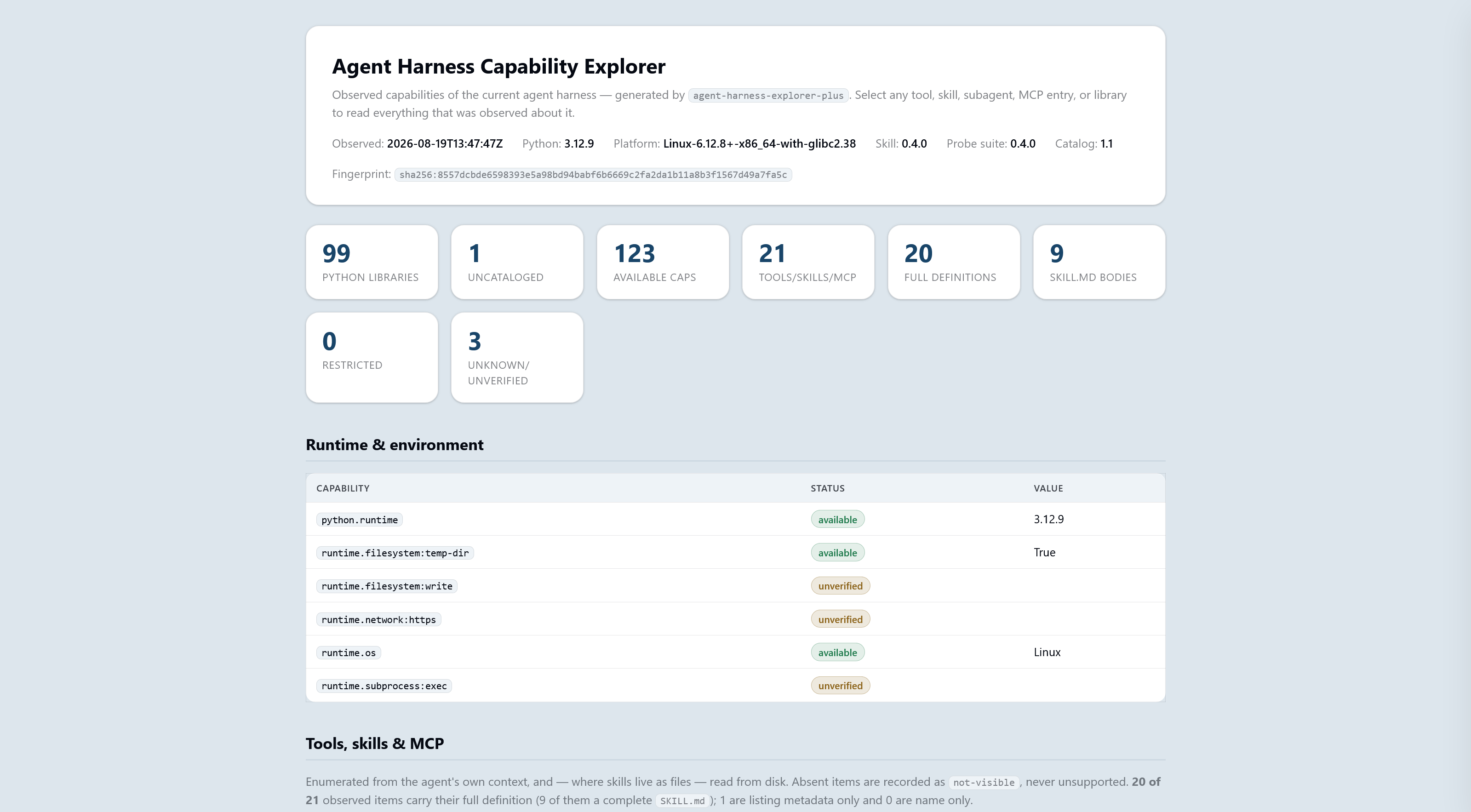
By default the probes are passive. Active checks can write a temporary file, start a process, or make an HTTPS call. They run only with the --active-safe flag. That flag was not used in the measurement this article builds on. Three properties of the runtime are therefore marked unverified in the report:
runtime.filesystem:writeruntime.subprocess:execruntime.network:https
That does not contradict the statement about the blocked outbound network. It only means the measurement tool did not test the network actively. The claim about the sandbox network boundary comes from Microsoft's documentation.
The skill behind the report
agent-harness-explorer-plus
Add the package as a skill in an agent and ask it to inspect its harness. The result is a self-contained HTML report where every tool, skill, and library can be opened.
33 files · 127 KB compressed · MIT · extended from Microsoft CAT
Run the Inspection in Your Own Agent
You can reproduce the measurement in Copilot Studio with the ZIP package above. The flow follows Microsoft CAT's guide to Agent Harness Explorer, but the images below show the new build experience and our extended version of the skill.
The screenshots were taken in a Swedish-language Copilot Studio, so a few labels appear in Swedish. Where that happens, the English term follows in parentheses.
Create an agent
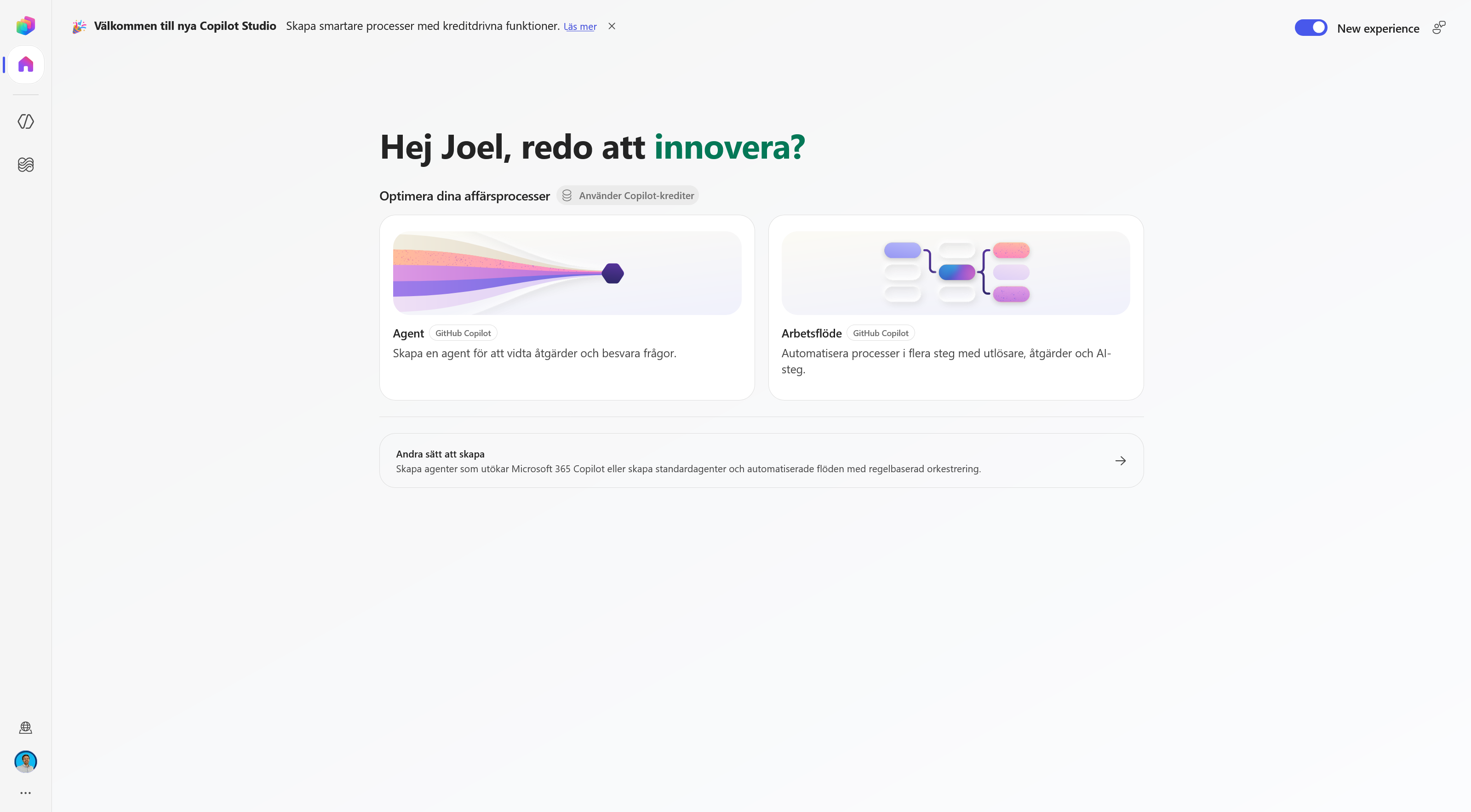
Open the Copilot Studio home page and choose Agent. Check that the new experience is enabled.
Open Skills in the build view
The agent's name can be changed, but it does not affect the inspection. Find Skills in the panel on the right and click the plus sign.
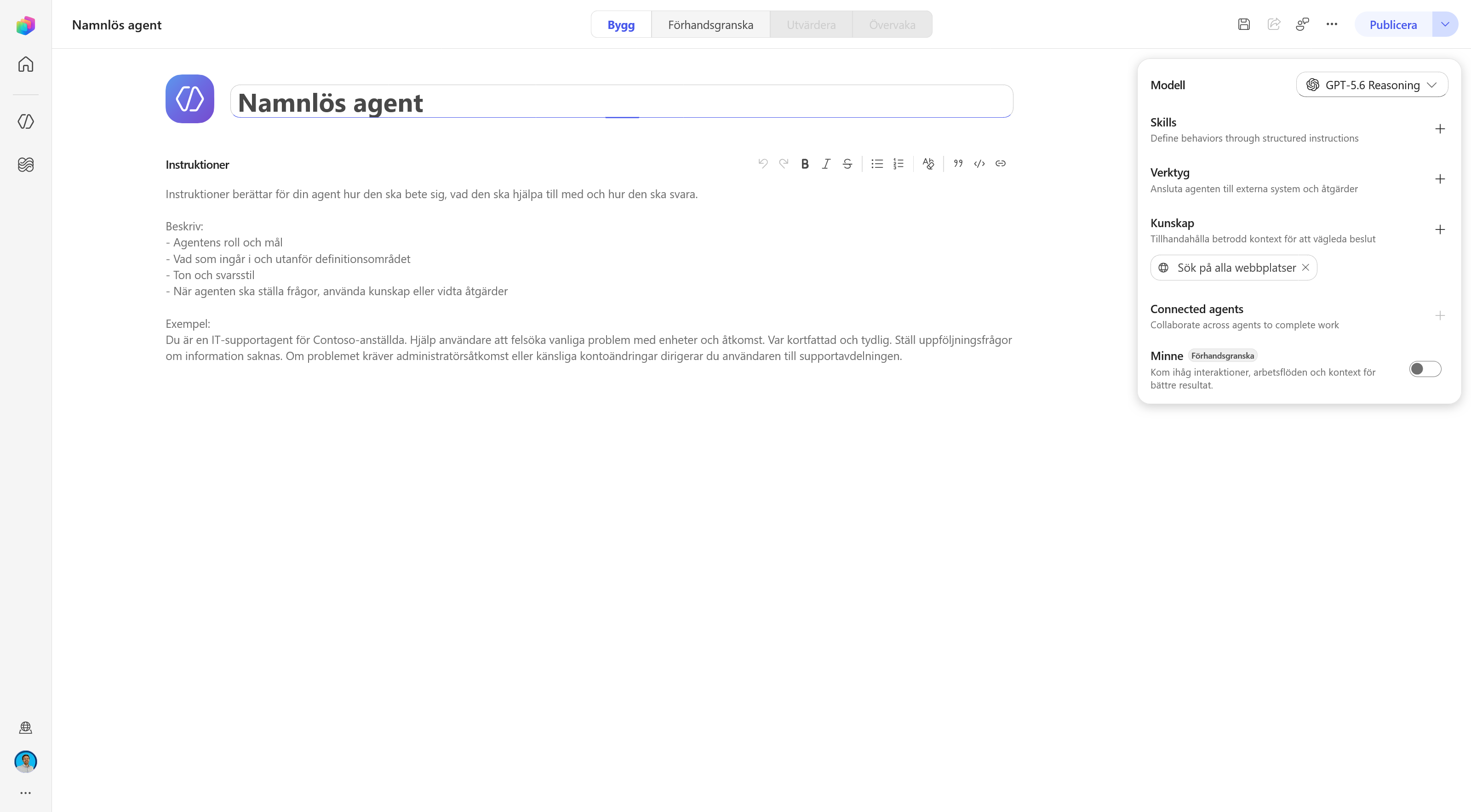
Choose to upload a skill
Select Upload a skill in the dialog. Copilot Studio accepts a single SKILL.md or a ZIP package that contains the file.
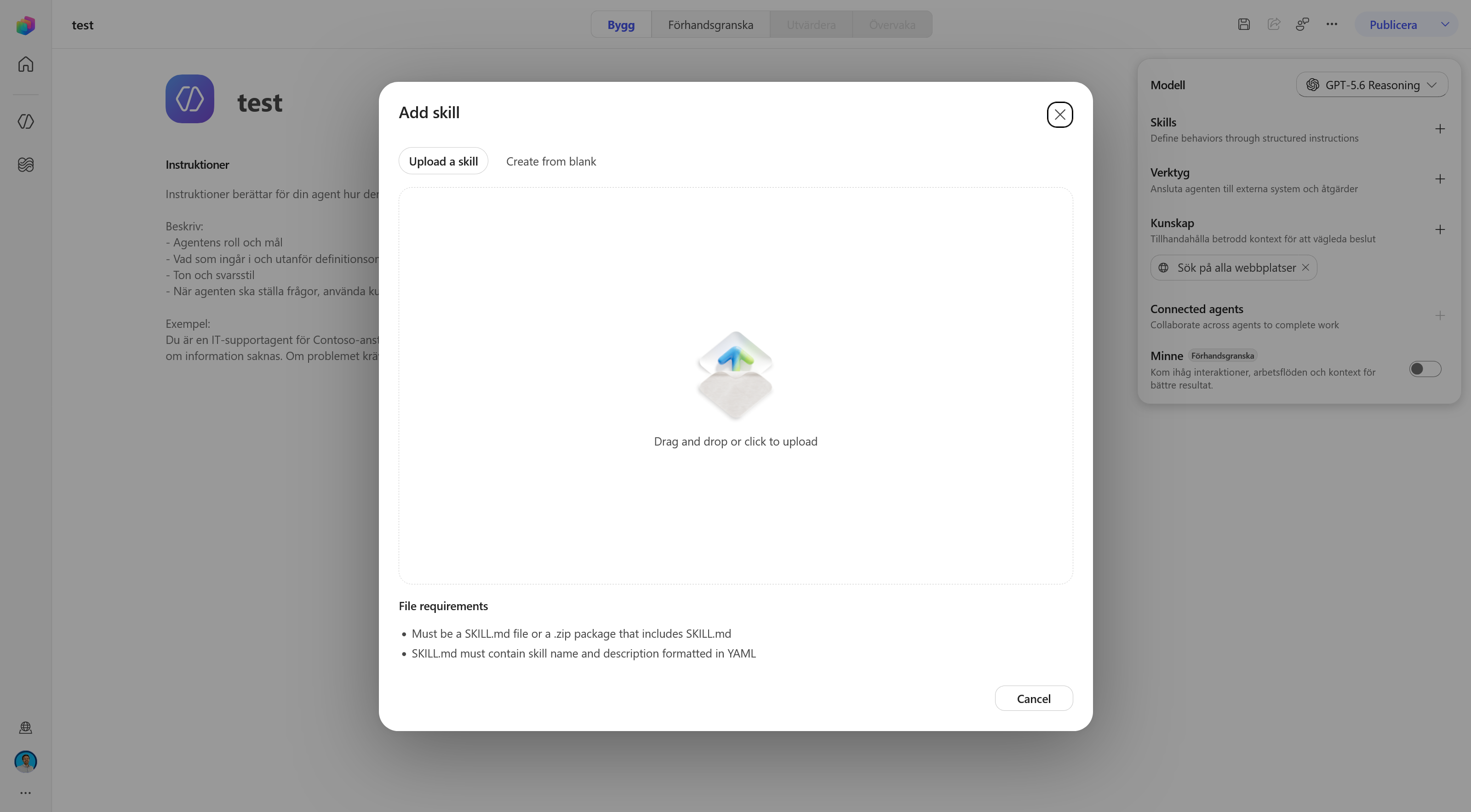
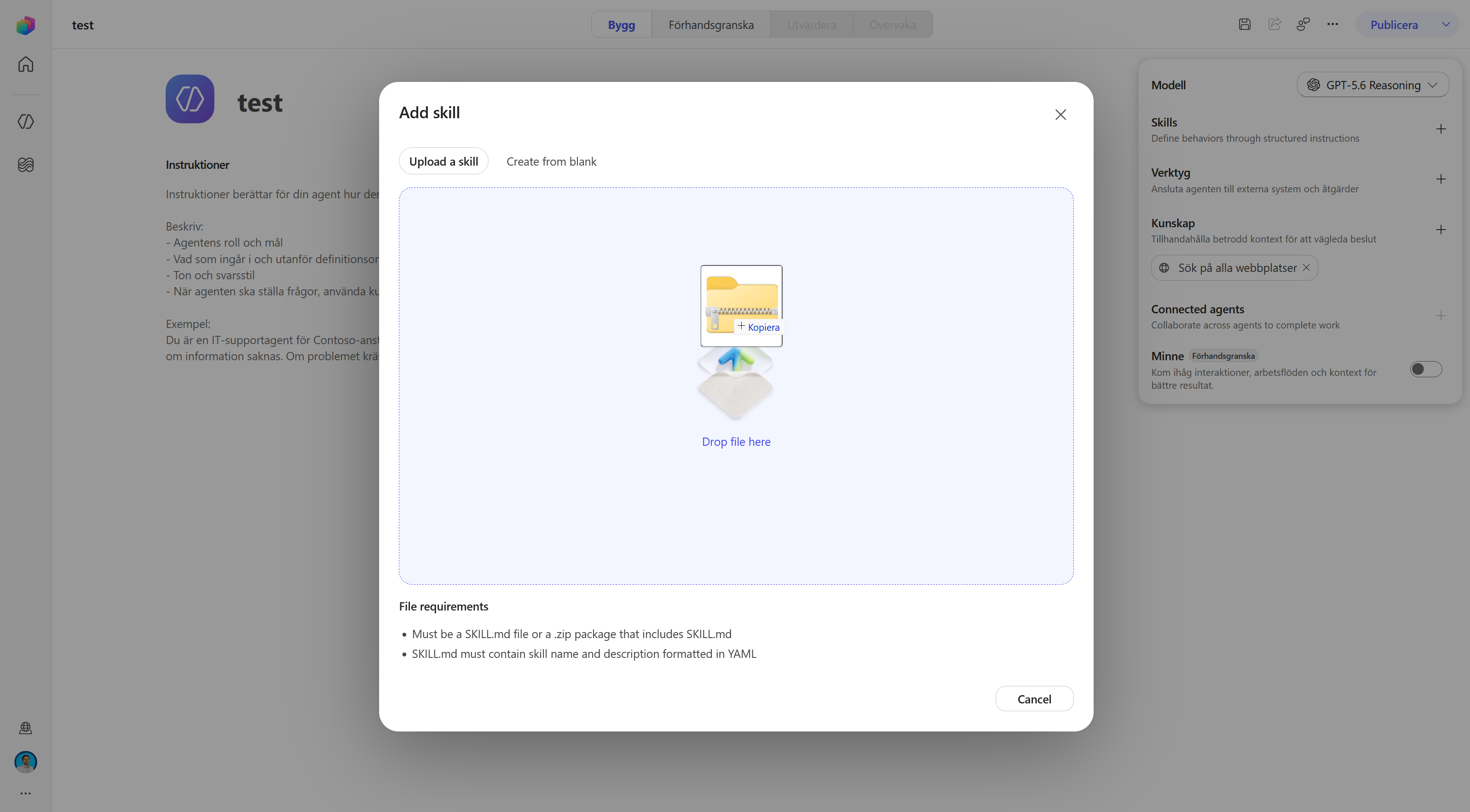
Upload the ZIP package
Drag agent-harness-explorer-plus.zip onto the upload area, or click the area and pick the file. Wait until the upload finishes.
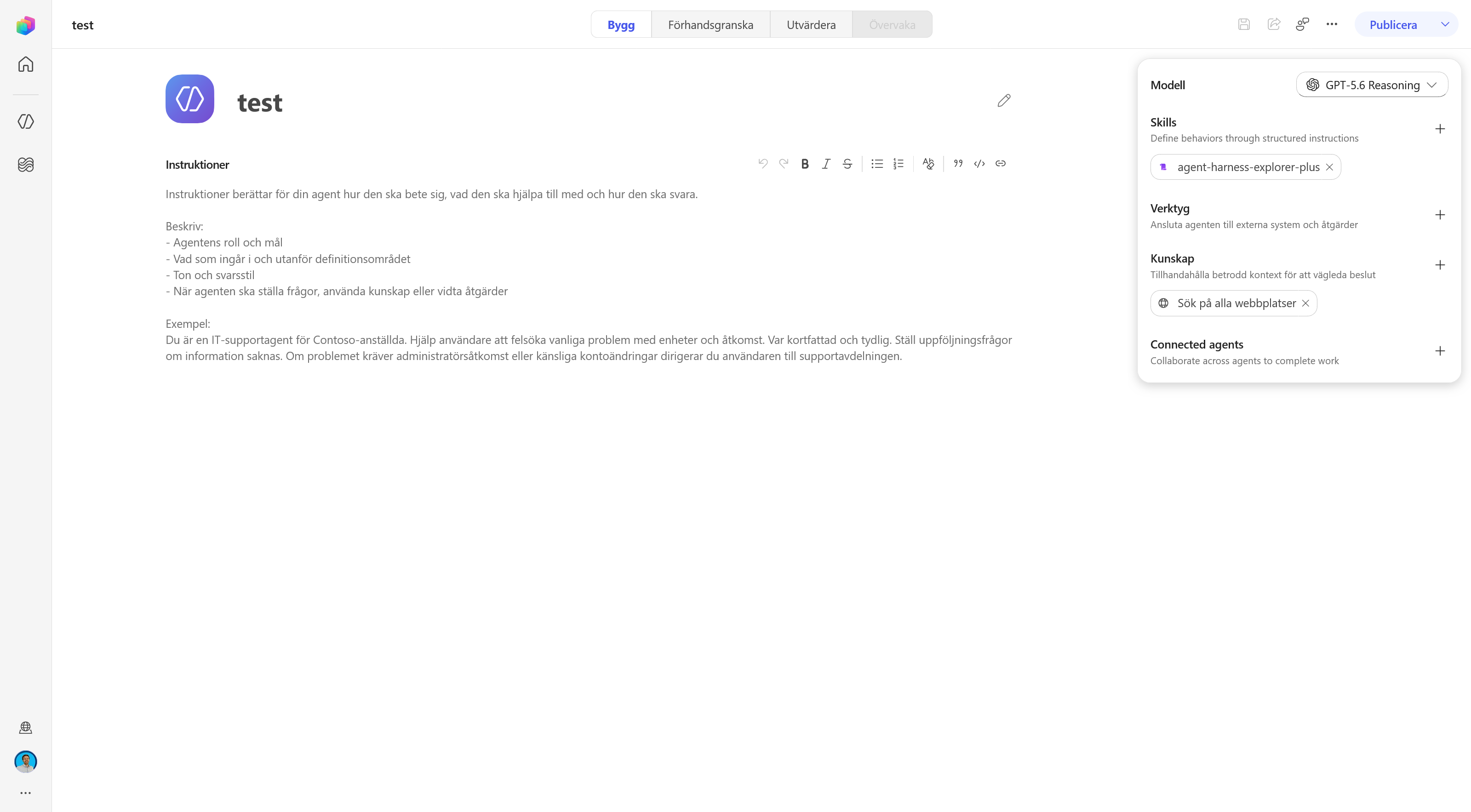
Check the skill and open the preview
When agent-harness-explorer-plus appears under Skills, the installation is done. Then click Förhandsgranska (Preview) at the top.
Ask the agent to inspect its harness
Leave Förhandsversion för slutanvändare (End user preview) turned off if you want to see the detailed activity trace. Type Please inspect the harness in the chat and send the message.
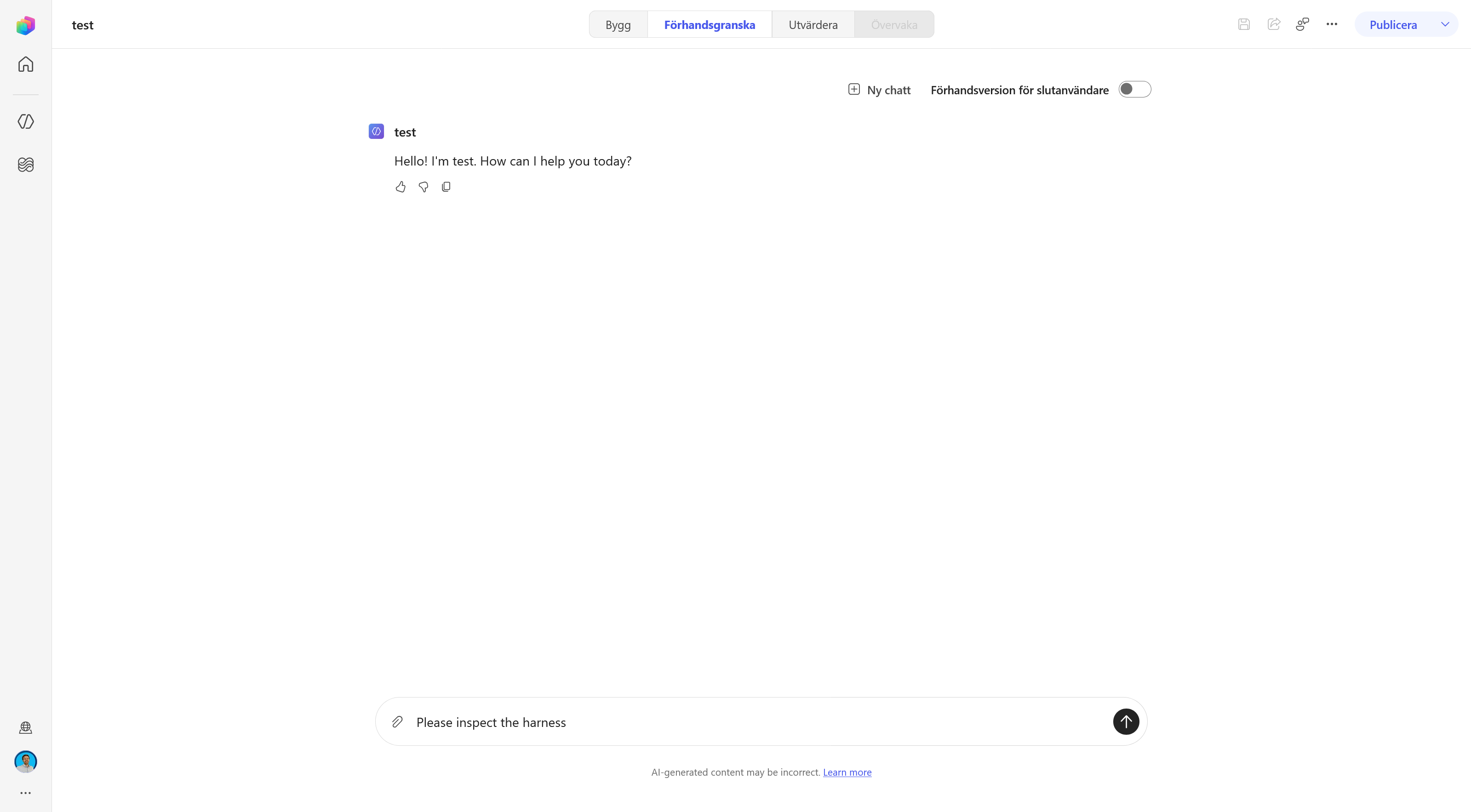
Review the run and download the report
Wait until the inspection finishes. In the activity trace you can follow which tools and scripts were used. Then click the attached report file and save it as an HTML file.
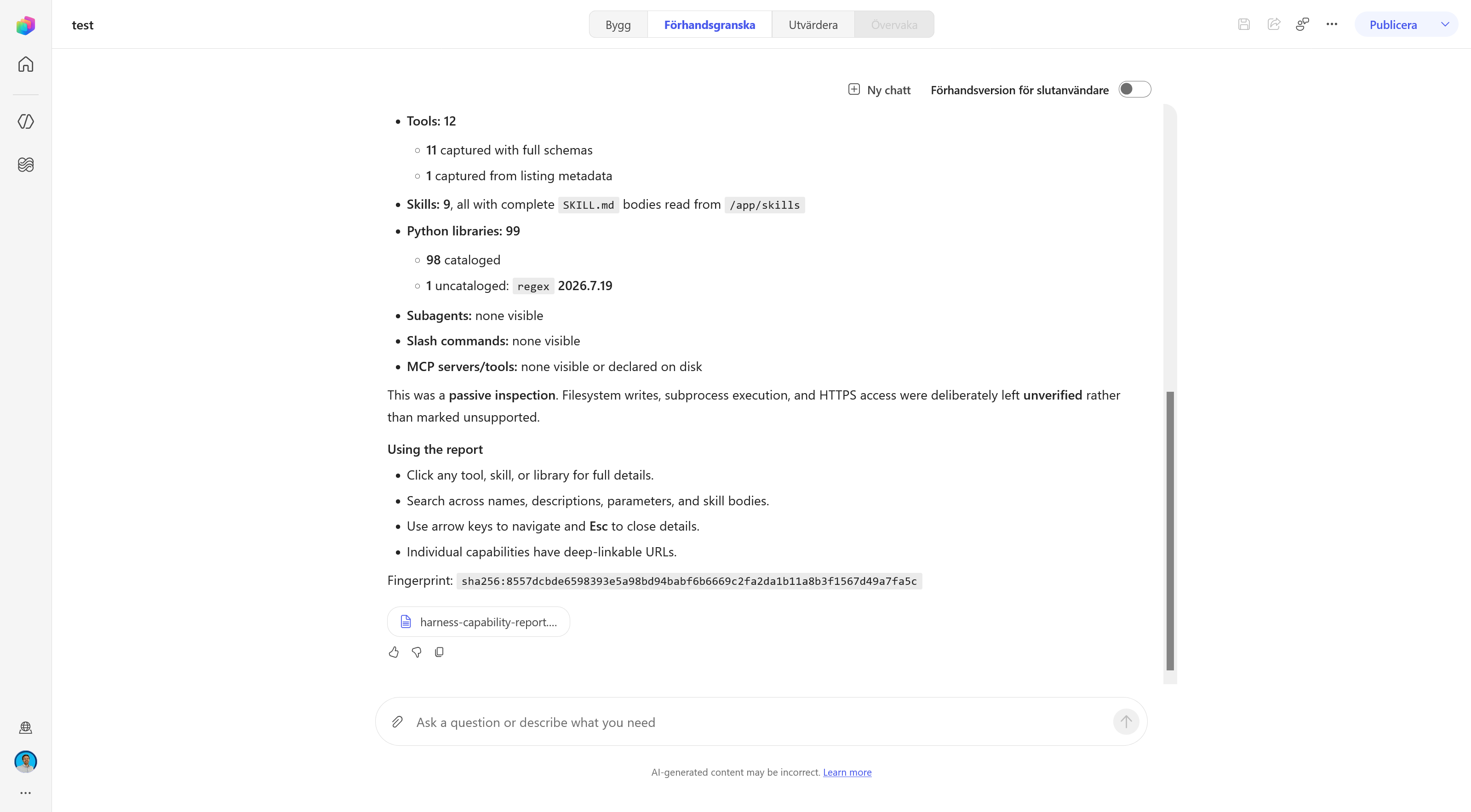
Open the HTML report
Open the saved file in your browser. The report is self-contained, so you can search it and open details about tools, skills, and libraries without starting Copilot Studio again.
What the Measurement Says and Does Not Say
The clearest conclusion is that the GitHub Copilot harness works more like a coding agent than like a traditional chatbot. It has a temporary workspace, runs code, searches and edits files, follows processes over time, and loads specialized instructions when the task calls for it.
Four findings carry that conclusion:
- The sandbox is an isolated execution environment with Python and local files, but with no outbound network path.
- The twelve built-in tools are dominated by shell, search, and file operations.
- The 99 Python packages provide ready-made building blocks for documents, data, charts, and OCR.
- The eight built-in skills describe not only what the agent should do, but also how it should search, preprocess, and verify.
What the measurement does not show is the full internal architecture of the service. It does not prove that Copilot Studio runs the same harness implementation as GitHub Copilot CLI, that every installed package is used in the active call chain, or that today's tool list will be unchanged tomorrow.
That is why the report is most valuable as a dated snapshot. It makes the hidden working environment visible enough to reason about, without pretending that observations are product promises.
If you want to see what gets connected outside the sandbox, there is the new Copilot Studio, covering building blocks, cost, and the differences from the standard harness. Work IQ MCP walks through the most common external connection. For the broader agent concepts, there is AI agents and agentic systems.
About the published report. Microsoft's built-in SKILL.md files are abridged in the web version to their heading structure and the directives discussed above. Tool schemas, the package inventory, and the source labeling remain. The full local measurement was used when fact-checking the article.