
Where Does Your AI Live? A Guide to Five Ways to Deploy Models
Publicerad July 3, 2025 av Joel Thyberg

AI is everywhere, right? It feels like every day you hear about new AI agents, smart "copilots," and systems set to revolutionize how we work and live. But have you ever stopped to think about what that actually means? When an app uses AI, where does the magic happen? Where does the AI brain itself live?
Understanding this is one of the most important things to grasp right now. The answer to that question affects everything:
- The cost of the service.
- The security of your data.
- The performance—that is, how fast and well everything works.
Today, we're going to demystify exactly this. We'll go through the five most common ways to deploy an AI model, from your own computer all the way to the massive data centers run by tech giants.
Before We Start: A Few Key Concepts
To follow along, we need to quickly clarify a few central concepts.
1. Parameters
Parameters are the single most important component of an AI model—it's where all its "knowledge" is stored. You can think of them like the synapses in a human brain. A brain with few synapses cannot think as complexly as a brain with very many. Similarly, an AI model with more parameters is generally more capable and "smarter."
 Few parameters (synapses) lead to simpler thought patterns.
 Many parameters (synapses) enable complex reasoning.
The number of parameters is often stated directly in the model's name. For example, Llama-3.1:8B means the model has 8 billion parameters. For comparison, the well-known GPT-4 model is estimated to have over 1 trillion (1000 billion) parameters.
Ultimately, the amount of VRAM your graphics card has determines how "smart" a model you can run locally.
2. GPU
To understand VRAM, we first need to understand what a graphics card, or GPU (Graphics Processing Unit), does. Imagine the difference between a professor (CPU) and an army (GPU).
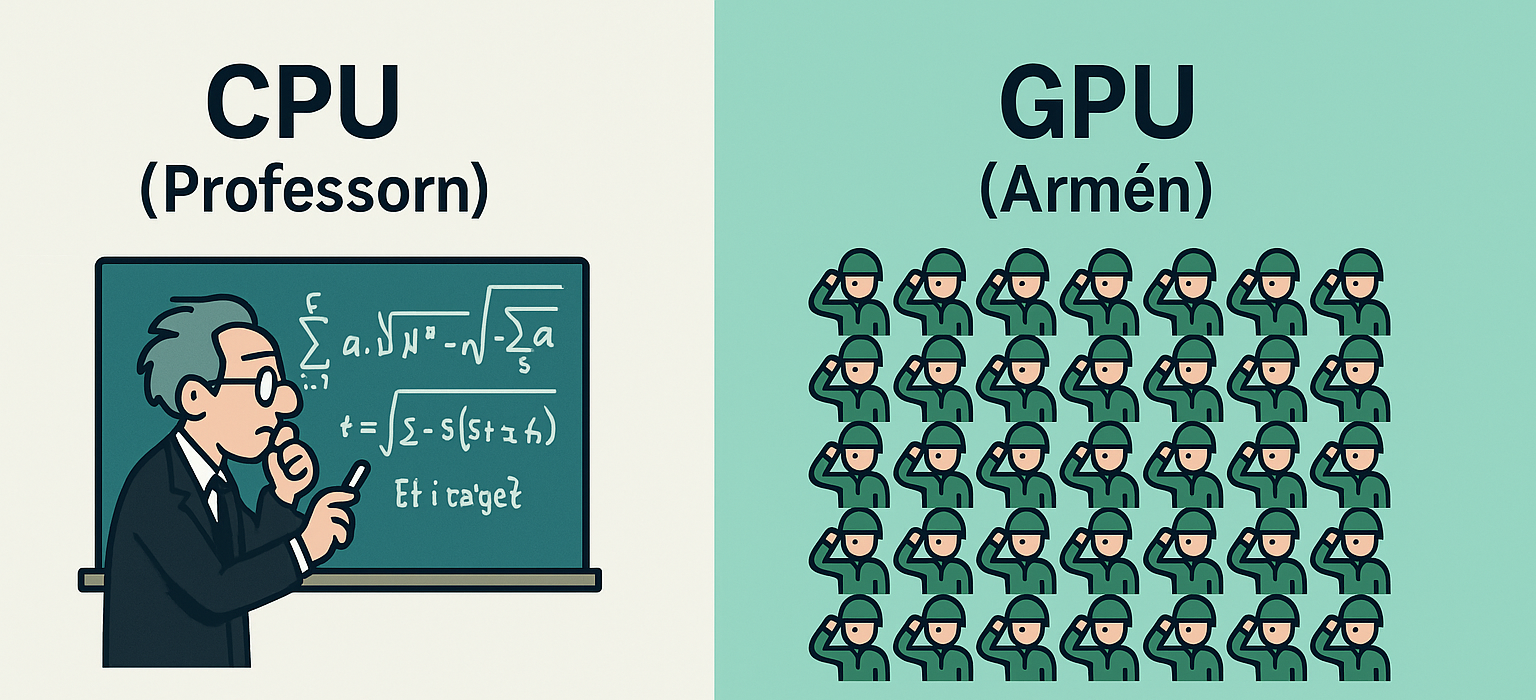
A CPU (Central Processing Unit), found in all computers, is like the professor: extremely smart and capable of solving difficult, complex problems, but only one at a time. A GPU, on the other hand, is like an army. Each individual soldier isn't as smart as the professor, but because there are thousands of them, they can collectively solve enormous numbers of simple problems at the exact same time (in parallel). AI computations consist of millions of simple operations that need to happen simultaneously, making GPUs perfect for the job.
VRAM (Video Random-Access Memory) is the GPU's own, super-fast working memory. This is where all the information the GPU needs immediate access to must reside. For AI, this means that all of the model's parameters must fit into VRAM at the same time.
We can compare it to assembling a puzzle. The parameters are the puzzle pieces, and VRAM is the surface of your desk.
 If not all puzzle pieces (parameters) fit on the desk (VRAM), you can't assemble the puzzle.
 If all the puzzle pieces fit, you can easily complete the task.
If your VRAM (measured in Gigabytes, GB) is large enough to hold all the model's parameters (also measured in GB), you can run it. Otherwise, you can't.
3. Server
Simply put, a server is a computer optimized for a single purpose: to "serve" data and services to other computers (clients) 24/7, year-round. Unnecessary components for a regular user, like a screen, keyboard, and mouse, are often removed. Every time you visit a website, stream a movie, or send an email, your device communicates with a server somewhere in the world.
4. API
An API (Application Programming Interface) is a digital messenger that allows different programs to talk to each other. For AI services, this is the most common method for giving users access to a model running on a server. Let's use a restaurant analogy:
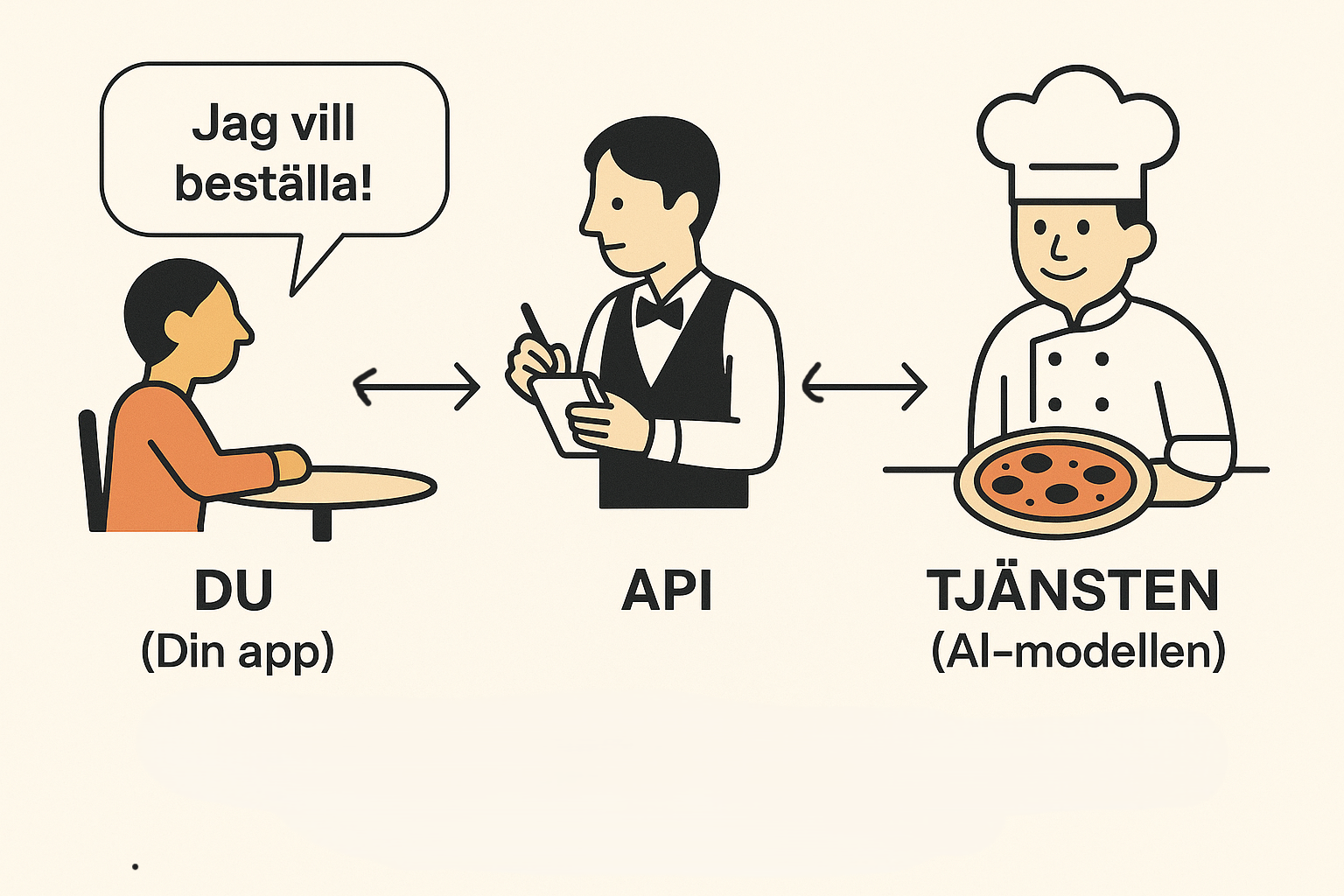
- The Guest (You/Your App): You arrive at the restaurant with a need—you're hungry and want food.
- The Menu (API Documentation): You're given a menu that describes exactly what the kitchen can prepare. This is like the provider's instruction manual, saying: "Here are the functions we offer and how to ask for them."
- The Waiter (The API): You place an order from the menu. The waiter takes your specific request, validates it ("Is this a valid dish from the menu?"), and delivers it to the kitchen.
- The Kitchen (The AI Model): The kitchen receives the order and prepares the food. The AI model receives your request and generates a response.
- The Waiter (The API): Finally, the waiter brings the finished dish from the kitchen back to your table. The API delivers the finished response from the AI model back to your application.
Option 1: Entirely Local on Your Device
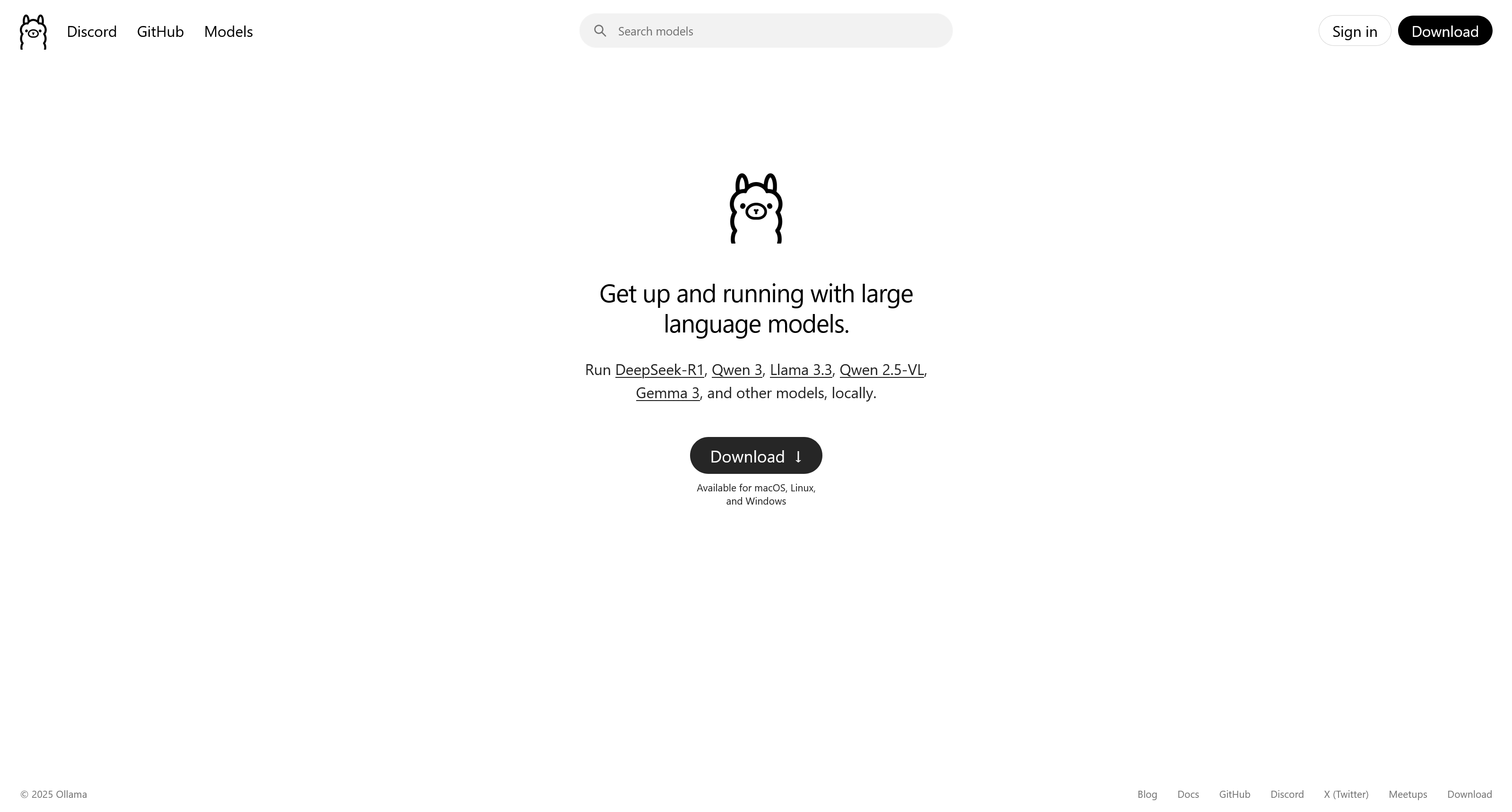
The first, and for many the most appealing, option is to run an AI model directly on your own computer. Thanks to tools like Ollama, this process has become surprisingly simple. Here's how it works:
Step 1: Download Ollama Visit the Ollama website and download the software for your operating system.
Step 2: Choose a Model Browse hundreds of models on the Ollama website or another large model hub like Hugging Face.
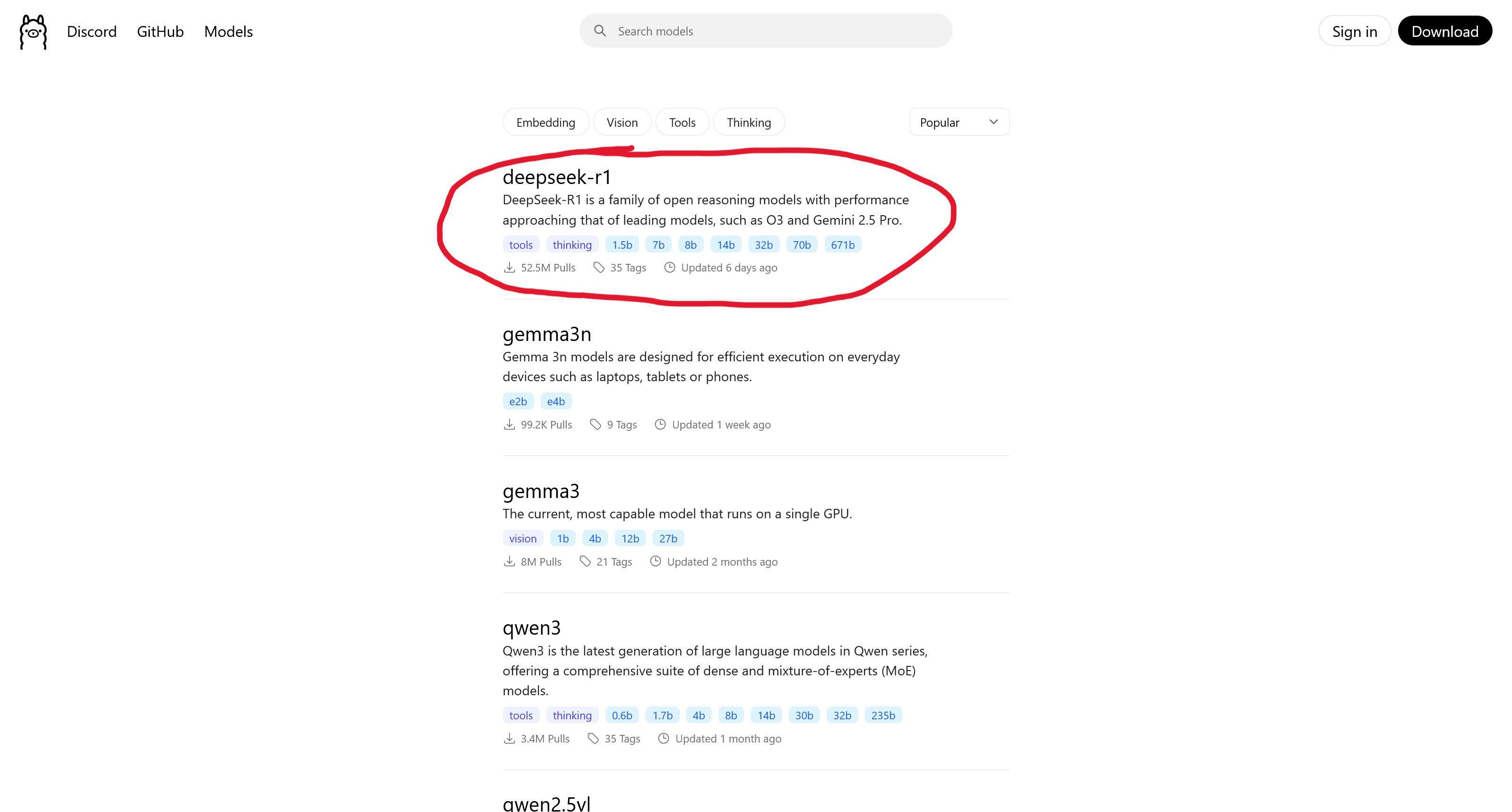
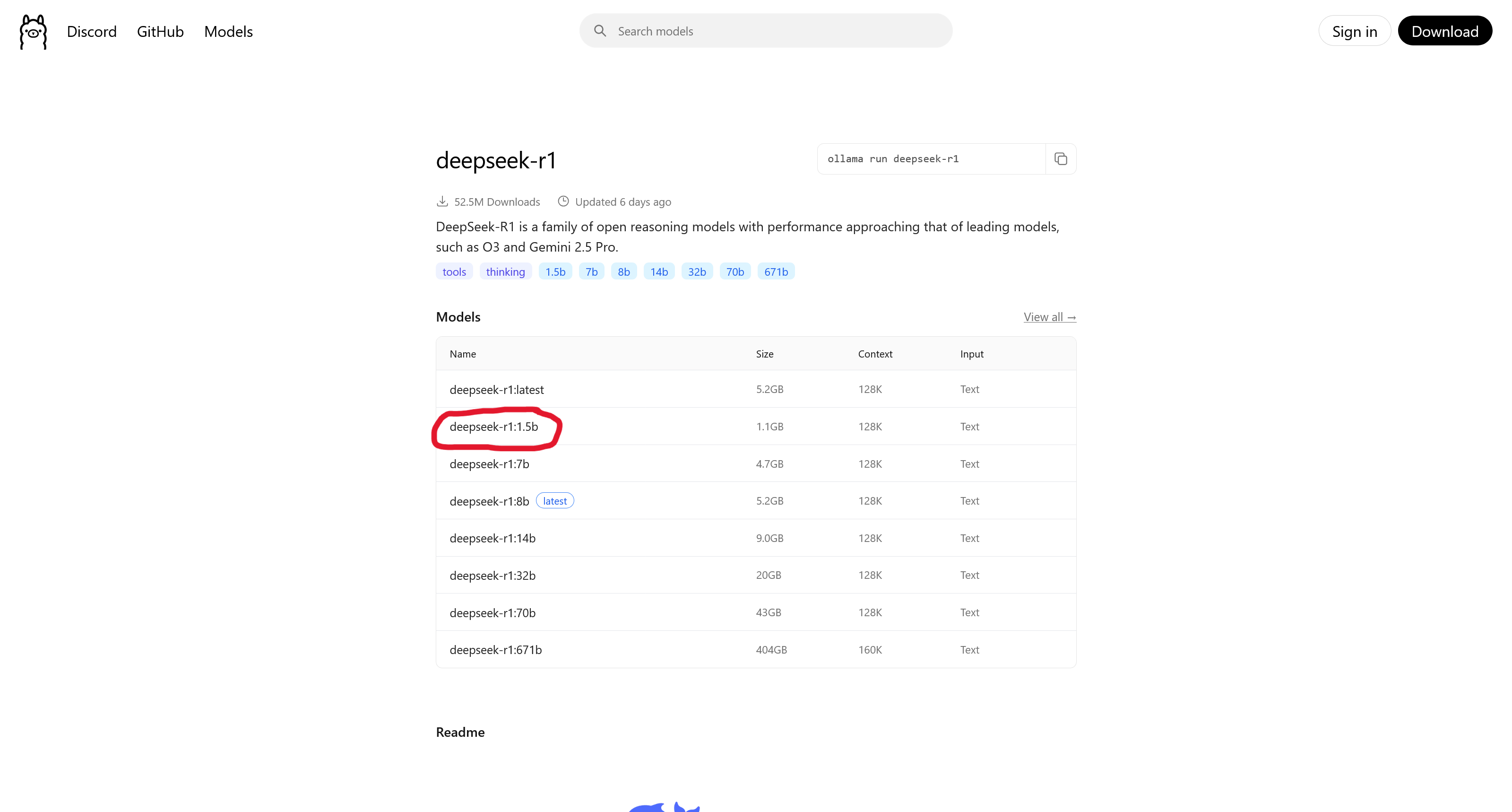
Step 3: Select a Version and Copy the Command Once you've found a model, go to its page, select a specific version (tag), and copy the installation command.
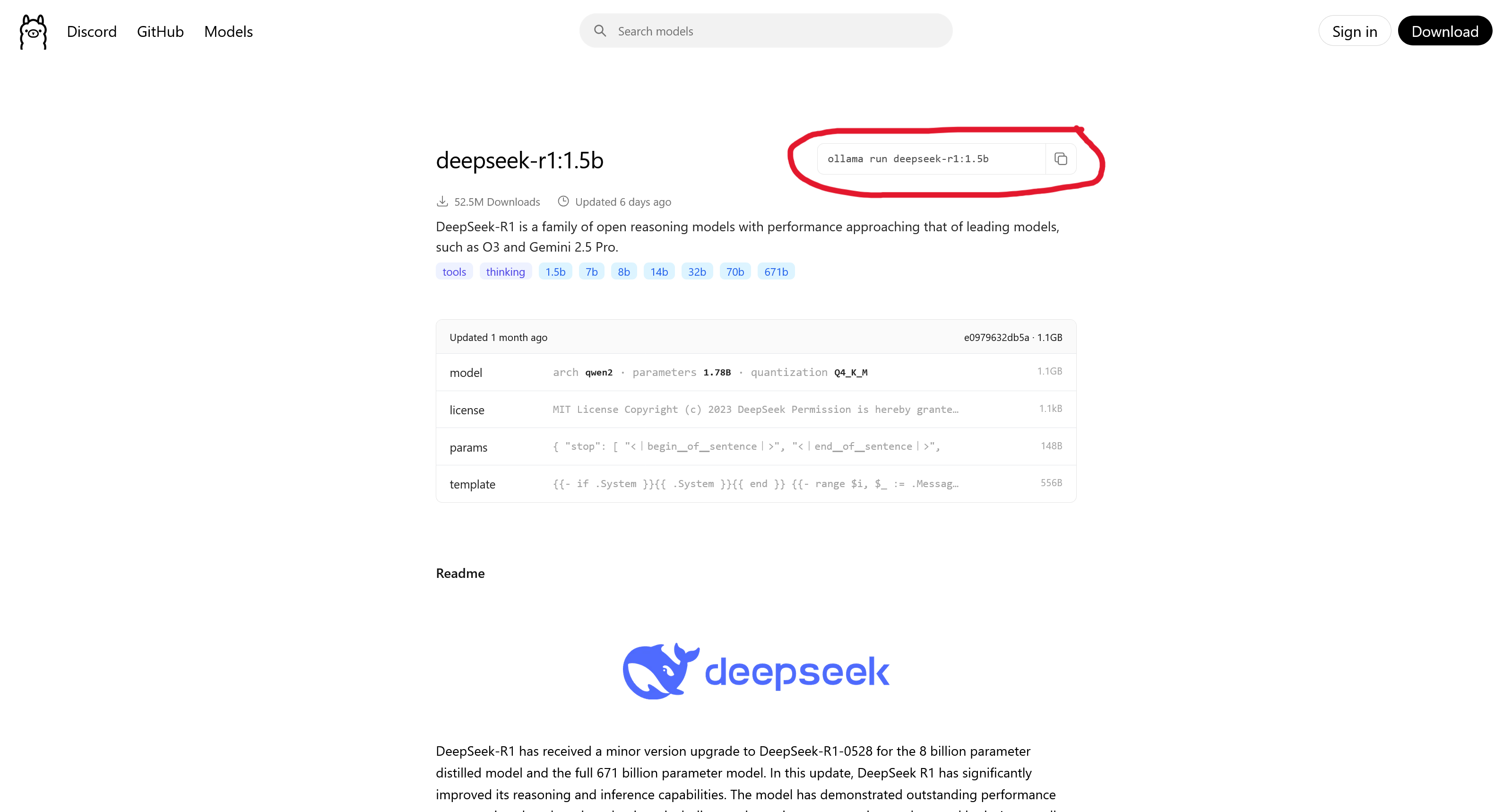
Step 4: Run the Command in Your Terminal Open the terminal on your computer, paste the command, and press Enter. The model will now download.
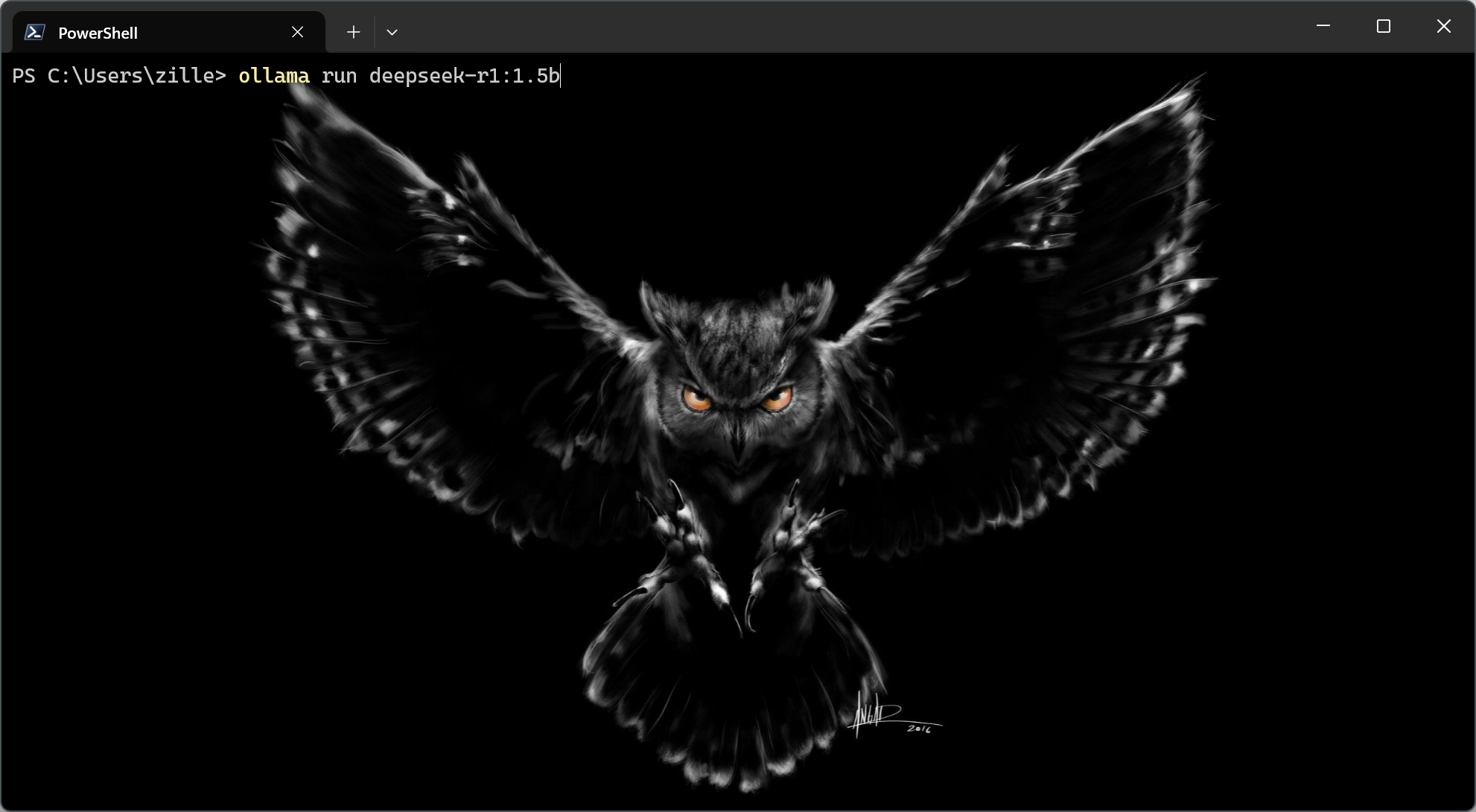
Once the download is complete and you see the text >>> Send a message (/? for help), you're ready to start chatting with your local AI!
Advantages
The advantages of this method are obvious:
- Privacy & Security: All data stays on your computer. Nothing is sent over the internet. This is the most secure option.
- Offline Access: You don't need an internet connection to run the model.
- Cost: It's free! The models are usually open source, so the only cost is your computer and the electricity it consumes.
Disadvantages
But of course, there are disadvantages, and the biggest one is hardware.
- Demanding Hardware: Running an AI model locally requires significant computing power, especially from the graphics card (GPU) and its memory (VRAM). The larger and smarter a model is, the more VRAM is required just to start it. Here's a rough guide:
| Model Size | VRAM (approx.) | Computer & Cost (approx.) |
|---|---|---|
| 7 Billion | 8–10 GB | A standard, modern gaming PC ($1000–$1500) |
| 13 Billion | 16–20 GB | A more powerful enthusiast PC ($2000–$3000) |
| 70 Billion | 40–48 GB | Professional workstation, often with two GPUs ($4000+) |
| >100 Billion | 80+ GB | Dedicated AI server ($10,000+) |
-
Large Files & Cumbersome Management: AI models are not small programs. A single model file can be anywhere from 4 to over 50 gigabytes. It takes time to download and uses a lot of space. If multiple people need to use the model, everyone has to download it, and ensuring everyone has the correct and updated version can quickly become a hassle.
-
Limited Access & Legal Frameworks: The models you can download locally are almost exclusively open source. While many are fantastic, the most powerful models (like GPT-4o and Claude 3.5) are not available for download. Additionally, the models you can download come with legal terms. Just because a model is free doesn't mean you can do whatever you want with it. Always be sure to check the license:
- MIT / Apache 2.0: Very permissive. You can generally use, modify, and sell products that use the model.
- Llama 2/3 License: Allows commercial use, but with an important limit: if your service has over 700 million monthly users, you must obtain a special license from Meta.
- Creative Commons (Non-Commercial): Some models may not be used in commercial products and are for research only.
Option 2: Own Server (Buy vs. Rent)
The next step up from running locally on individual computers is to centralize the power into a single, dedicated server. This opens up two main paths, which can be best compared to buying a house in the country versus renting an apartment in the city.
 Buying (On-premise): Like a house in the country. You own everything and have full control, but also full responsibility for maintenance like power, cooling, and security.
 Renting: Like an apartment. You control your own space but share infrastructure (like networking and cooling) with others, and the property owner handles maintenance.
Let's break down what these two paths mean in practice.
Sub-option 2A: Buying a Server (On-premise)
Here, you purchase the hardware and place it in your own facilities. Once the server is installed and configured, it works just like in Option 1: you have full control to download and run any models you want.
Advantages:
- Full Data Control: This is the biggest advantage. When the server is in your own building, you have total physical and digital control. No data ever leaves your premises, providing maximum security and integrity.
- Centralized Management: Instead of installing and updating the AI model on ten different computers, you only need to manage it in one place. This saves a huge amount of time and ensures everyone uses the same version.
- Support for Weaker Devices: Since all the heavy computing power is in the server, your users can connect with virtually any device—a simple laptop, a tablet, or a mobile phone—and still access the AI's full power.
Disadvantages:
- High Upfront Cost: Buying a server powerful enough to run large AI models is a massive investment. We're often talking about tens of thousands of dollars for the hardware alone.
- Requires Technical Expertise: You are responsible for everything: installation, maintenance, cooling, power supply, and physical security. This requires a dedicated IT department with specialized knowledge.
- Dependent on Local Network: Although you don't need the internet, all devices must have a stable and fast connection to your local network to communicate with the server. If the network is down, so is the AI service.
Sub-option 2B: Renting a Server
Here, you rent a virtual server with a powerful GPU from a specialized provider. Once you've created an account and "started" your rented server, you log in and install the software and models you need, just like on a physical computer.
Advantages:
- No Large Upfront Investment: Instead of buying an expensive server, you pay a recurring monthly or hourly fee. This makes it much easier to get started and is kinder to your cash flow.
- Enormous Flexibility: This is a major strength. You can start with a smaller GPU and easily scale up to the latest and most powerful model on the market for a short-term project, then scale down again. You're not locked into hardware that becomes outdated.
- No Physical Maintenance: The provider handles all hardware, repairs, cooling, and security in their data centers. You can focus entirely on your software and AI models.
Disadvantages:
- Higher Long-Term Cost: If you have a constant and long-term need, the recurring rental costs over several years can become higher than what it would have cost to buy the server outright.
- Reduced Data Control: Although you have exclusive access to your rented server, your data is physically located with a third party. For most, the security is excellent, but it is technically a lower degree of control than having the server in your own locked room.
- Dependency on the Provider: Your service depends on your provider having good performance, no downtime, and not suddenly raising prices or changing their terms.
Providers for renting servers can vary. Some, like RunPod, offer GPU servers in secure, centralized data centers. Others, like Vast.ai, act as a marketplace where anyone can rent out their computing power, often at a lower price but with varying reliability.
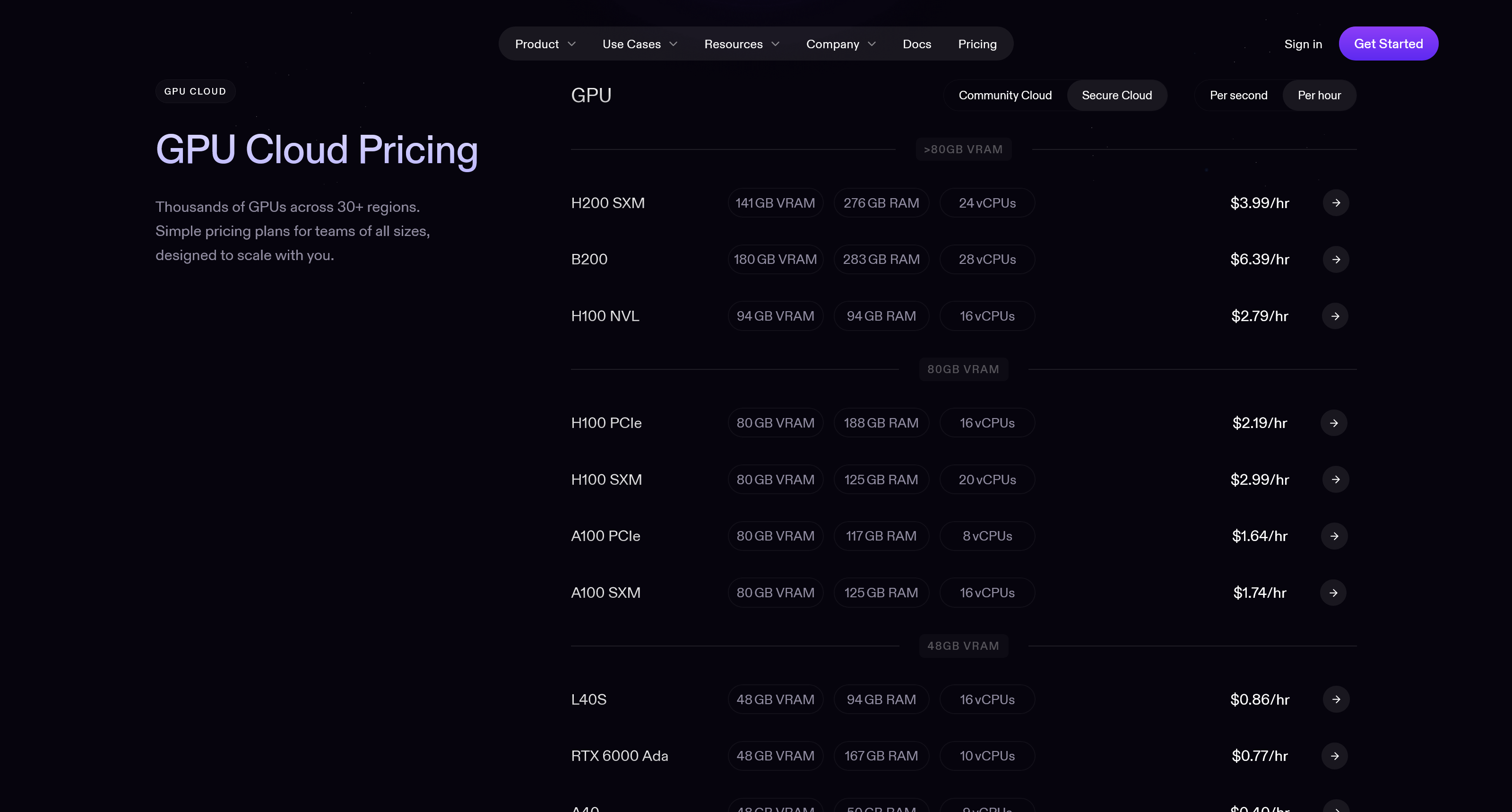 RunPod: Centralized and secure rentals.
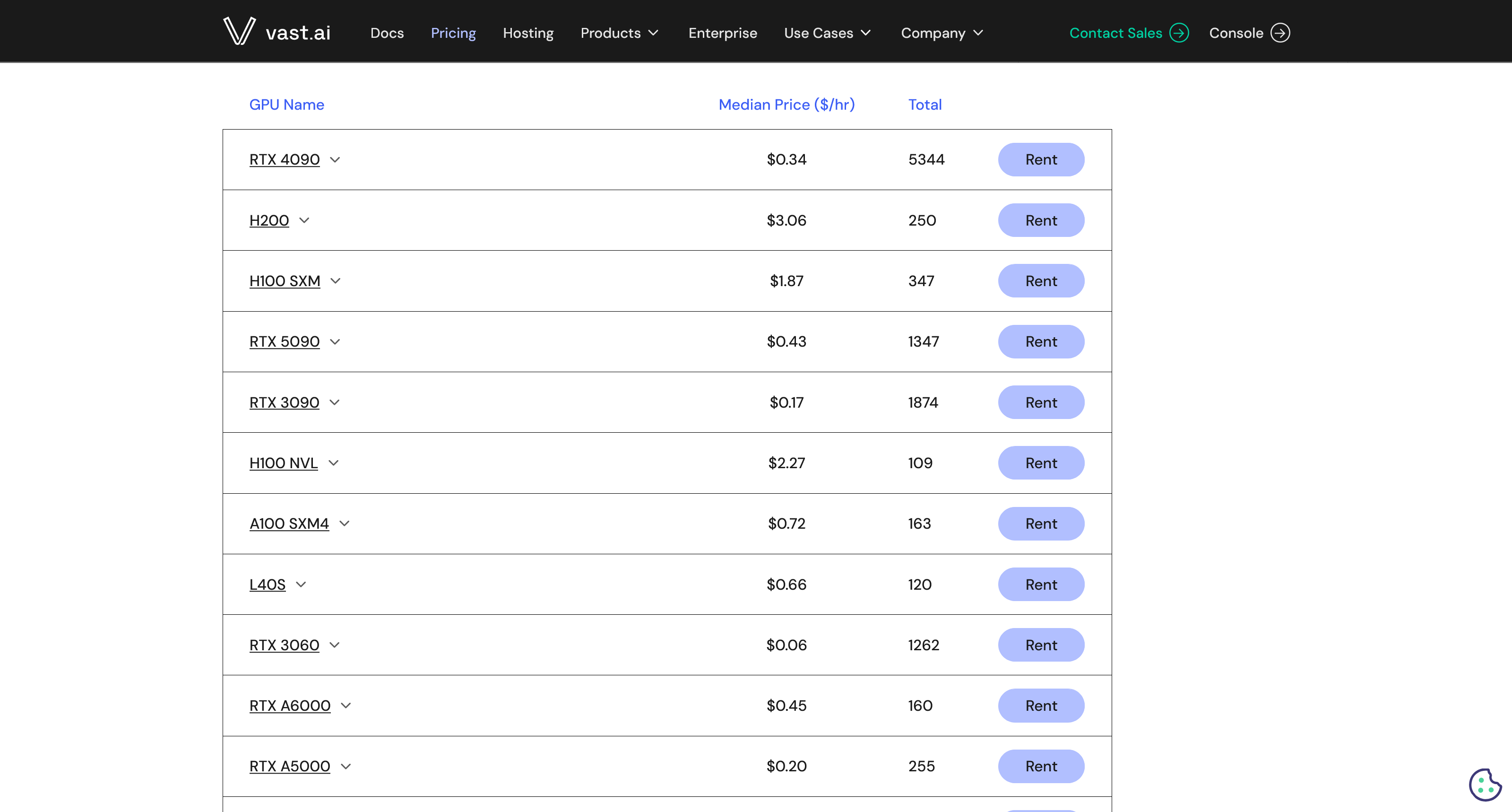 Vast.ai: Decentralized marketplace.
Option 3: Specialized "Inference" API Providers
Now we leave the world where we manage the hardware and software ourselves. This is the first option where we no longer download the AI model ourselves. Instead, we rely on a specialized provider who has done the heavy lifting for us. They have downloaded lots of popular open-source models, installed them on optimized servers, and made them available to us via an API.
One such provider is Groq, known for its extremely high speed. With this method, you don't need to rent an entire server. Instead, you have AI "on tap" and pay only for what you use. The payment model is almost always based on tokens—you pay a certain price for the tokens you send in your request (input) and another price for the tokens you get back in the response (output).
In the image below, we see an excerpt from Groq's price list. It shows what different models cost per million input tokens and one million output tokens.
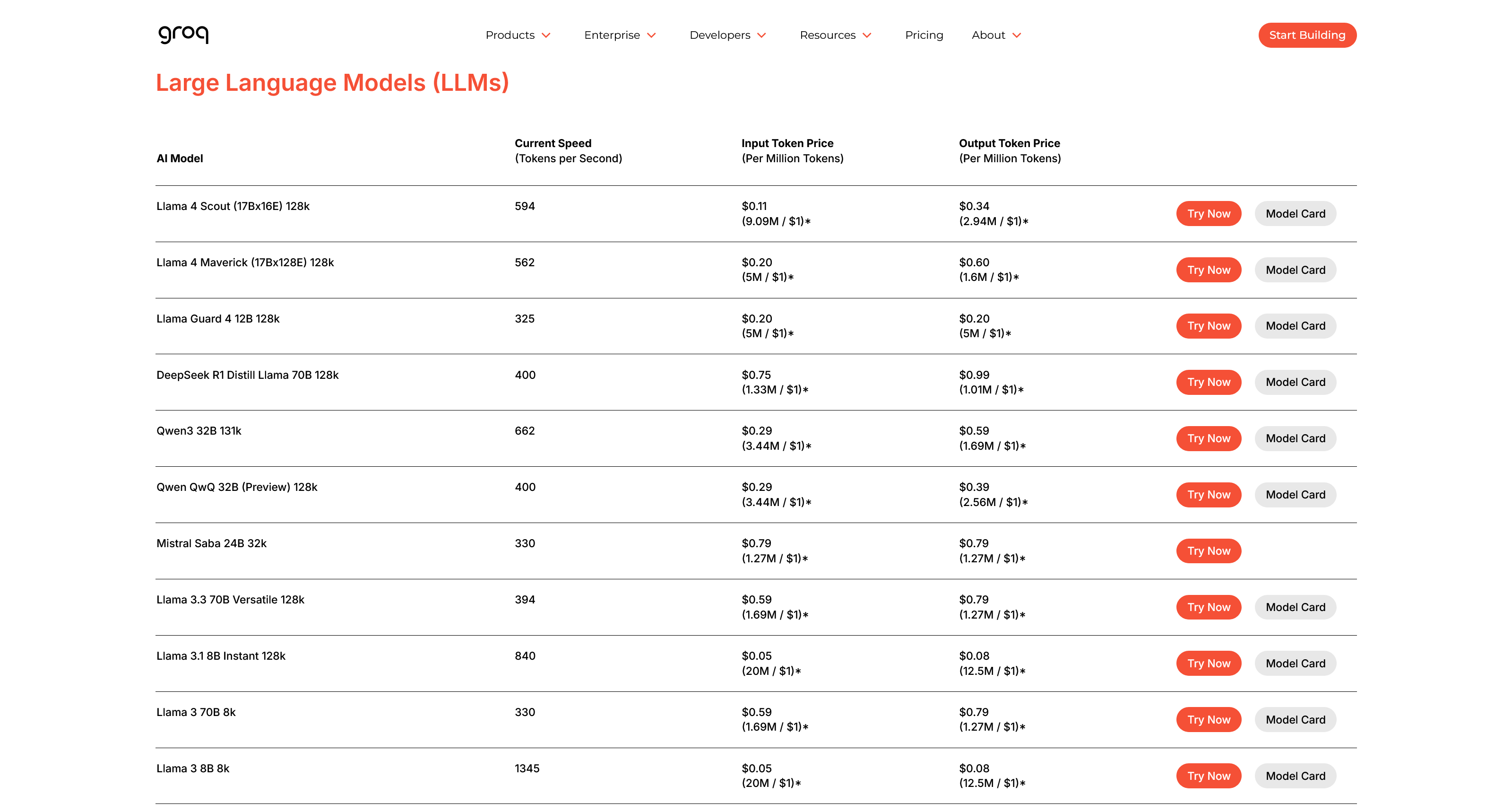
We can draw a couple of conclusions from this:
- Output is usually more expensive than input. It costs the provider more to generate a response than to simply receive a query.
- Larger models cost more. Models with more parameters (like Llama 3 70B compared to 8B) have a higher price per token. This is logical, as they require more powerful servers with more VRAM to run.
Advantages:
- Extremely Cost-Effective (Pay-as-you-go): You pay only for the computing power you actually use, down to the second. If your app has no users overnight, the cost is zero. This is perfect for startups and projects with uneven or unpredictable traffic.
- Unbeatable Simplicity and Speed: You can go from idea to a working prototype in minutes. You don't need to know anything about server management or optimization. You find a model, copy a few lines of code, and your app can suddenly use AI.
- Access to Optimized Models: These companies are specialists. They often run the models on the absolute best hardware and have optimized the software for maximum performance (high speed, tokens/second).
Disadvantages:
- Low Data Control and Security Risk: This is the biggest drawback. All data you send must leave your system and be processed by a third party. This option is unsuitable for sensitive data like patient records or trade secrets.
- Limited Model Selection: Although these platforms offer many popular models, they don't have all of them. You are limited to the catalog that the provider chooses to maintain, losing the freedom to experiment with any model you want.
- Unpredictable Costs with Success: "Pay-as-you-go" can be a double-edged sword. It's cheap to start, but if your application suddenly goes viral, the costs can skyrocket uncontrollably, making it difficult to budget.
Option 4: The Major Cloud Platforms
Here we step onto the home turf of the real tech giants: Amazon Web Services (AWS), Google Cloud, and Microsoft Azure. These platforms are not just providers; they are entire ecosystems for building and scaling applications. When it comes to AI, they offer a hybrid-like model where you can often choose between two paths:
- Rent a server: You rent dedicated GPU power (similar to Option 2) and have full control to install and run any AI model you want in their cloud infrastructure.
- Use a managed service: You use an API to access a plethora of models they have already optimized and prepared (similar to Option 3), via services like AWS Bedrock, Google Vertex AI, or Azure AI Studio.
Building on these platforms comes with a unique set of pros and cons.
Advantages
- Enormous Scalability and Reliability: These platforms are built to handle traffic on a global scale. You can go from ten users to ten million without your application crashing. With data centers around the world, they guarantee high availability and performance no matter where your users are.
- Fully Integrated Ecosystem: This is the greatest strength. Your AI model can seamlessly and efficiently communicate with all other parts of your application—your database, your file storage, your user management—because everything is within the same platform. This enormously simplifies the development of complex systems.
- World-Class Security and Certifications: While data integrity can be debated, the technical security of these giants is unmatched. They have thousands of employees working solely on security and possess a host of industry-specific certifications (e.g., for healthcare and finance) that are extremely difficult and expensive to obtain on your own.
Disadvantages
- The Cost: The benefits offered by the platforms, such as global scalability and advanced security, come at a price. You pay a premium for the convenience and peace of mind, which means it is rarely the cheapest option.
- Data Integrity: You must place full trust in these mega-corporations to handle your data correctly according to your agreements.
- Geopolitical Risk: As we've seen in turbulent times, there's always a risk that countries can block access to services from other countries, which can become a huge problem if your entire business relies on it.
Option 5: Directly from the Source (Proprietary APIs)
The final option is for when only the absolute best will do: going directly to the source. Here, we're talking about using APIs from the companies that actually create the most talked-about and powerful models, like OpenAI, Anthropic, and Google.

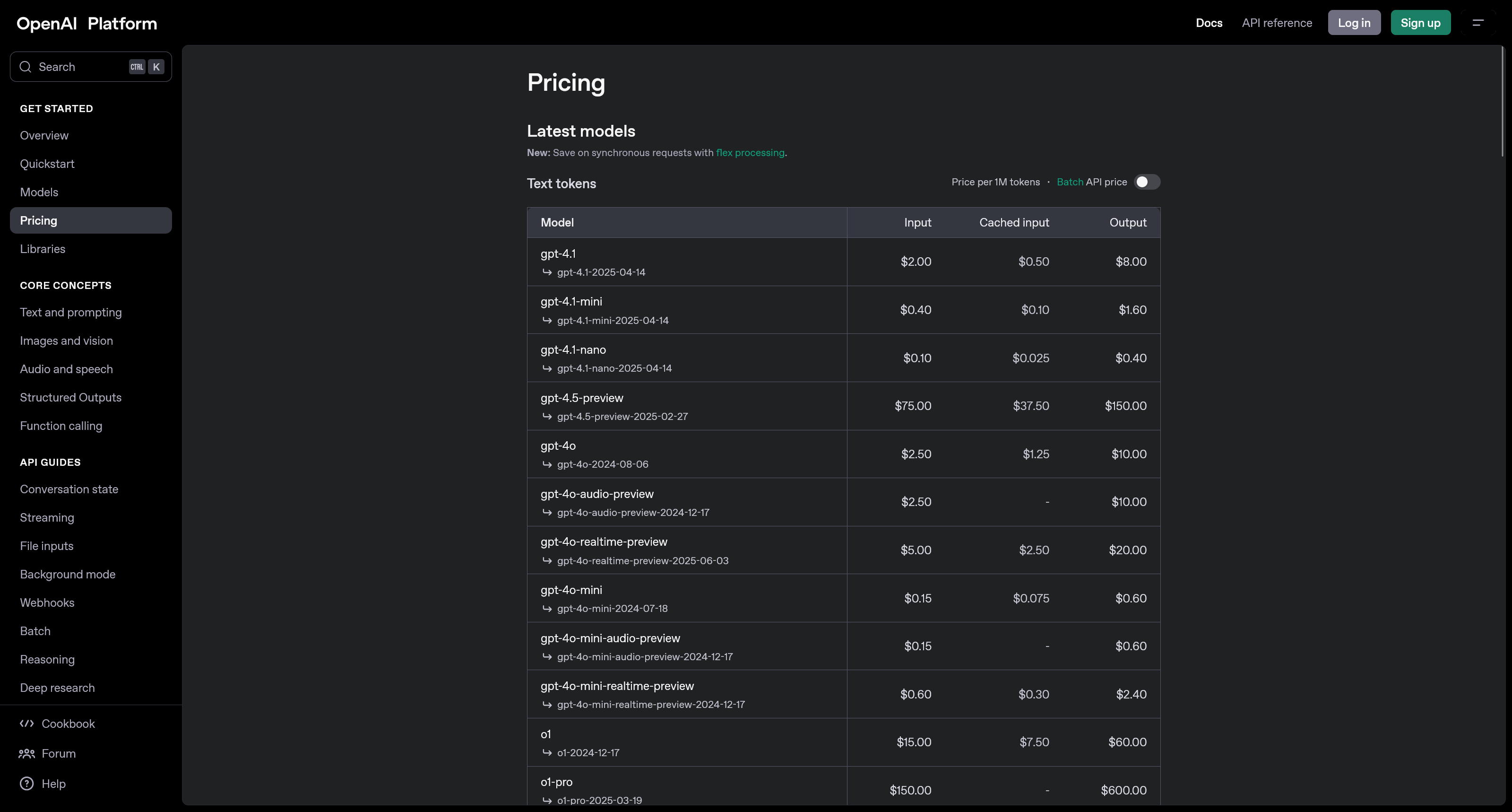
This is similar to Option 3, but with the crucial difference that the provider is the exact same company that created the model. Instead of a catalog of various open-source models, you get access to a company's specific, often closed-source and state-of-the-art models. For example, if you go to OpenAI, you can use their API to access the exact same powerful models you can chat with in their well-known service ChatGPT—the difference is that you can now integrate that power directly into your own systems, AI agents, or apps.
Just like with other API services, you pay per token, and the prices vary depending on the model's capability.
Advantages:
- Access to State-of-the-Art Models: You get to use the very latest and most powerful models (like GPT-4o, Claude 3.5 Sonnet) as soon as they are released. These are "state-of-the-art" models that are not available for download.
- Unique Built-in Capabilities: These APIs often offer more than just text. They have advanced, built-in features for understanding images and video, calling external tools, and searching the web, all packaged in a convenient call.
- Minimal Maintenance: This is the easiest path. You don't need to think about anything other than calling their API. All maintenance, updates, and operation of the underlying supercomputer are handled entirely by the provider.
Disadvantages:
- Highest Cost: Using the best models is expensive. This is almost always the priciest option per "token," and the cost can quickly become very high with large-scale use.
- Greatest Data Integrity Risk: You send your data directly to the AI research lab that develops the model. Their policies often allow them to use (anonymized) data to train future models, which is a significant risk for any sensitive information.
- Content Filters and Censorship: These commercial services have strong, built-in filters to prevent inappropriate content. You have no control over these filters, and they can block legitimate requests if they are accidentally flagged. It's worth noting that not all open-source models (which can be run locally) are necessarily uncensored, but there are popular examples like Dolphin, which are designed to give the user full control over the model's guidelines.
Summary: What Should You Choose?
As we've seen, there's no single answer to where an AI model "should" live. The choice of deployment method is a complex balancing act that depends entirely on your unique needs and circumstances. No single option is the best in all situations; each method has its distinct advantages and disadvantages.
Is data security and complete control your top priority? Then the local options (1 and 2A), where you own the hardware yourself, are unbeatable. Is access to the absolute highest performance and the latest models crucial instead? Then the proprietary APIs (5) will be the obvious choice. For those seeking a flexible and scalable middle ground, rented servers (2B), specialized APIs (3), or the major cloud platforms (4) might be the perfect compromise. If budget is a deciding factor, feel free to check out our blog post [placeholder] which goes into detail on this, where you can also play around and test different budget scenarios.
The table below provides a brief comparison based on various aspects to give a quick overview.
| Method | Upfront Cost | Usage Cost | Quality | Privacy | Scalability | Simplicity | Latency | Maintenance Burden | Customization |
|---|---|---|---|---|---|---|---|---|---|
| 1 Local on Device | ★★☆☆☆ | ★★★★★ | ★★☆☆☆ | ★★★★★ | ★★☆☆☆ | ★★☆☆☆ | ★★★★★ | ★★★★☆ | ★★★★★ |
| 2A Own Server | ★☆☆☆☆ | ★★★★☆ | ★★★☆☆ | ★★★★★ | ★★☆☆☆ | ★☆☆☆☆ | ★★★★☆ | ★☆☆☆☆ | ★★★★★ |
| 2B Rented Server | ★★★★☆ | ★☆☆☆☆ | ★★★☆☆ | ★★★★☆ | ★★★☆☆ | ★★★☆☆ | ★★★☆☆ | ★★★☆☆ | ★★★★★ |
| 3 Inference API | ★★★★★ | ★★★☆☆ | ★★★★☆ | ★☆☆☆☆ | ★★★★★ | ★★★★★ | ★★☆☆☆ | ★★★★★ | ★★☆☆☆ |
| 4 Cloud Platform | ★★★★☆ | ★★☆☆☆ | ★★★★☆ | ★★★☆☆ | ★★★★★ | ★★★★☆ | ★★★★☆ | ★★★★☆ | ★★★☆☆ |
| 5 Direct API | ★★★★★ | ★★☆☆☆ | ★★★★★ | ★★☆☆☆ | ★★★★★ | ★★★★★ | ★★★☆☆ | ★★★★★ | ★★☆☆☆ |
For a complete walkthrough of all options, including a detailed financial analysis, see the video below.
Resources
- Tools & Platforms:
- Ollama - Run language models locally.
- Hugging Face - The world's largest hub for AI models.
- Server Rental (GPU):
- API Providers:
- Other: